# index.html.md
# mdreport
Build Markdown reports programmatically with a chainable API. Add headings, text, lists, callouts, figures, code blocks,
templates, Polars DataFrames, and SVG diagrams.
## Install
```bash
pip install mdreport
```
`mdreport` requires Python 3.12 or later.
## Create a report
```python
from mdreport import MarkdownReport
report = (
MarkdownReport()
.title("Q3 review")
.heading("Revenue")
.text("Revenue grew {{revenue_growth}}%.", params={"revenue_growth": 4})
.bullet_list(["EMEA grew 6%", "APAC grew 2%"])
)
report.save("q3-review.md")
```
Each method adds content and returns the report. Chain methods when the sequence is clear, or call them one at a time.
Create a diagram and embed it in a report:
```python
from mdreport import Diagram, DiagramTheme, MarkdownReport, NodeRole, title_node
diagram = Diagram("Ingest", width=466, height=89, theme=DiagramTheme.LIGHT)
title_node(diagram, 89, 17, 288, "Source", role=NodeRole.ROOT)
report = MarkdownReport().title("Ingest")
report.append(diagram.figure(caption="Source node"))
report.save("ingest.md")
```
## Read the documentation
* [Markdown](markdown.html.md)
* [Add common content](markdown.html.md#add-common-content)
* [Add a callout](markdown.html.md#add-a-callout)
* [Add figures](markdown.html.md#add-figures)
* [Add a DataFrame](markdown.html.md#add-a-dataframe)
* [Add template values](markdown.html.md#add-template-values)
* [Add frontmatter](markdown.html.md#add-frontmatter)
* [Add a table of contents](markdown.html.md#add-a-table-of-contents)
* [Link to headings](markdown.html.md#link-to-headings)
* [Render or save](markdown.html.md#render-or-save)
* [Diagrams](diagrams.html.md)
* [Draw one node](diagrams.html.md#draw-one-node)
* [Embed the diagram](diagrams.html.md#embed-the-diagram)
* [Join two nodes](diagrams.html.md#join-two-nodes)
* [Fit the node to the copy](diagrams.html.md#fit-the-node-to-the-copy)
* [Add a legend](diagrams.html.md#add-a-legend)
* [Group the flow](diagrams.html.md#group-the-flow)
* [Branch on a condition](diagrams.html.md#branch-on-a-condition)
* [Show a record and annotate it](diagrams.html.md#show-a-record-and-annotate-it)
* [Divide work into lanes](diagrams.html.md#divide-work-into-lanes)
* [Name a node with an icon](diagrams.html.md#name-a-node-with-an-icon)
* [Choose a theme](diagrams.html.md#choose-a-theme)
* [Palette keys](diagrams.html.md#palette-keys)
* [Brand the palette](diagrams.html.md#brand-the-palette)
* [Adjust border widths](diagrams.html.md#adjust-border-widths)
* [Use gradients](diagrams.html.md#use-gradients)
* [Frame the canvas](diagrams.html.md#frame-the-canvas)
* [Draw a shape the library does not have](diagrams.html.md#draw-a-shape-the-library-does-not-have)
* [Save or serialize](diagrams.html.md#save-or-serialize)
* [The scale](diagrams.html.md#the-scale)
* [Component sizes](diagrams.html.md#component-sizes)
* [API reference](api-reference.html.md)
* [Report](api-reference.html.md#report)
* [Blocks](api-reference.html.md#blocks)
* [Diagrams](api-reference.html.md#diagrams)
* [Golden-ratio scale](api-reference.html.md#golden-ratio-scale)
* [Diagram components](api-reference.html.md#diagram-components)
* [Heading anchors](api-reference.html.md#heading-anchors)
* [Extension protocols](api-reference.html.md#extension-protocols)
* [Errors](api-reference.html.md#errors)
* [Token builders](api-reference.html.md#token-builders)
* [Template helpers](api-reference.html.md#template-helpers)
* [DataFrame helpers](api-reference.html.md#dataframe-helpers)
* [Parser](api-reference.html.md#parser)
* [Extensions](extensions.html.md)
* [Create a block](extensions.html.md#create-a-block)
* [Add a block](extensions.html.md#add-a-block)
* [Return tokens](extensions.html.md#return-tokens)
* [Read the finished document](extensions.html.md#read-the-finished-document)
## LLMs and coding agents
LLMs and coding agents can read the documentation in Markdown format:
- [llms.txt](llms.txt) — a linked index of every page.
- [llms-full.txt](llms-full.txt) — the whole documentation as a single Markdown file.
# api-reference.html.md
# API reference
## Report
### *class* MarkdownReport
Bases: [`object`](https://docs.python.org/3/builtins/functions.html#object)
Build a Markdown document.
Provides a fluent interface for building markdown documents with various content types
including headings, text, tables, lists, code blocks, and more. Supports Jinja2
template rendering for dynamic content generation.
- Method chaining for fluent report building
- Jinja2 template support for dynamic content
- Polars DataFrame integration for tables and CSV exports
- Automatic formatting of numeric data with configurable precision
- Numbered figures and captions
- Portable semantic callouts
- Support for nested lists and various markdown elements
- Export to file or string rendering
Every content method returns the report itself, so calls chain. Content is
held as a Markdown syntax tree rather than as text, so `render` is what
serializes it; a report can be rendered repeatedly and keeps building
afterwards.
#### \_\_init_\_(anchor_style=HeadingAnchorStyle.IMPLICIT)
Create an empty report with its own parser and no frontmatter.
* **Parameters:**
**anchor_style** ([*HeadingAnchorStyle*](api-reference.html.md#mdreport.HeadingAnchorStyle)) – How each heading’s anchor is written into the rendered
document. The default writes nothing and relies on the anchor the
renderer derives from the heading text, which is what
`table_of_contents` links to; pass `HeadingAnchorStyle.HTML`
or `HeadingAnchorStyle.ATTRIBUTE` for a renderer that derives
none.
#### append(block)
Append a block’s content to this report.
This is the extension point behind `table`, `code_block`, and
`table_of_contents`, and the way to add a block of your own: any object
with a `__report__` method satisfies `ReportBlock`.
A block implementing `__resolve__` (a `DeferredReportBlock`) is stored as
a placeholder and resolved during `render`, once the whole document is
known; every other block contributes its content immediately.
#### copy()
Return an independent report holding the same content and metadata.
Content, frontmatter, and parser state are independent, so appending to
the copy never affects this report. Use it to build several documents
from a shared preamble.
#### \_\_add_\_(block)
Return a copy of this report with a block appended, leaving it unchanged.
#### \_\_iadd_\_(block)
Append a block to this report in place.
#### frontmatter(data=None, \*\*kwargs)
Merge YAML frontmatter fields into the report metadata.
Fields accumulate across calls and later values win, so frontmatter can
be set up front and amended once results are known. The block is emitted
at the top of the document by `render`, in insertion order, and is
omitted entirely when no fields were set.
* **Parameters:**
* **data** ([*Mapping*](https://docs.python.org/3/library/collections.abc.html#collections.abc.Mapping) *[*[*str*](https://docs.python.org/3/builtins/stdtypes.html#str) *,* [*Any*](https://docs.python.org/3/library/typing.html#typing.Any) *]* *|* *None*) – Fields to merge, for keys that are not valid identifiers.
* **\*\*kwargs** ([*Any*](https://docs.python.org/3/library/typing.html#typing.Any)) – Fields to merge, for keys that are.
#### markdown(content, params=None)
Parse and append raw Markdown content.
The escape hatch for Markdown the other methods don’t build: block quotes,
footnotes, images, or a whole section held as a string. Content is parsed,
not inserted verbatim, so it must be valid Markdown; use `raw_token` via
`append` for text that must survive untouched.
* **Parameters:**
* **content** ([*str*](https://docs.python.org/3/builtins/stdtypes.html#str)) – Markdown source, treated as a Jinja template when params is given.
* **params** ([*Mapping*](https://docs.python.org/3/library/collections.abc.html#collections.abc.Mapping) *[*[*str*](https://docs.python.org/3/builtins/stdtypes.html#str) *,* [*Any*](https://docs.python.org/3/library/typing.html#typing.Any) *]* *|* *None*) – Template variables. None leaves the content unrendered, so
literal braces pass through safely.
#### directive(name, value=None)
Append a smolslides HTML-comment directive.
Directives are HTML comments, so they are invisible to Markdown renderers
that don’t understand them.
* **Parameters:**
* **name** ([*str*](https://docs.python.org/3/builtins/stdtypes.html#str)) – Directive name, written with the leading underscore smolslides
expects (`class` becomes ``).
* **value** ([*str*](https://docs.python.org/3/builtins/stdtypes.html#str) *|* *None*) – Directive argument, or None for a bare flag directive.
#### title(text, params=None)
Append an H1 heading.
Shorthand for `heading(text, level=1)`. Headings added by any method are
what `table_of_contents` later collects.
#### heading(text, level=2, params=None)
Append a heading at a level from one through six.
Inline Markdown in the text is parsed, so a heading can carry emphasis or
a link. Every heading becomes an entry in `table_of_contents`, nested by
its level and linked to the heading’s anchor — headings repeating the same
text are numbered apart, as `findings` and `findings-1`.
* **Parameters:**
* **text** ([*str*](https://docs.python.org/3/builtins/stdtypes.html#str)) – Heading text, treated as a Jinja template when params is given.
* **level** ([*int*](https://docs.python.org/3/builtins/functions.html#int)) – Heading level, 1 (`#`) through 6 (`######`).
* **params** ([*Mapping*](https://docs.python.org/3/library/collections.abc.html#collections.abc.Mapping) *[*[*str*](https://docs.python.org/3/builtins/stdtypes.html#str) *,* [*Any*](https://docs.python.org/3/library/typing.html#typing.Any) *]* *|* *None*) – Template variables.
* **Raises:**
[**ValueError**](https://docs.python.org/3/builtins/exceptions.html#ValueError) – if level is outside the Markdown heading range.
#### text(content, params=None)
Parse and append one or more Markdown text blocks.
A list appends each entry as its own separate block, which is how to get
distinct paragraphs; a single string containing blank lines parses into
paragraphs too.
* **Parameters:**
* **content** ([*str*](https://docs.python.org/3/builtins/stdtypes.html#str) *|* [*list*](https://docs.python.org/3/builtins/stdtypes.html#list) *[*[*str*](https://docs.python.org/3/builtins/stdtypes.html#str) *]*) – One Markdown block, or a list of them.
* **params** ([*Mapping*](https://docs.python.org/3/library/collections.abc.html#collections.abc.Mapping) *[*[*str*](https://docs.python.org/3/builtins/stdtypes.html#str) *,* [*Any*](https://docs.python.org/3/library/typing.html#typing.Any) *]* *|* *None*) – Template variables, applied to every block.
#### callout(message, kind=CalloutKind.NOTE, title=None, params=None)
Append a titled block quote drawing attention to content.
* **Parameters:**
* **message** ([*str*](https://docs.python.org/3/builtins/stdtypes.html#str)) – Markdown content displayed inside the callout.
* **kind** ([*CalloutKind*](api-reference.html.md#mdreport.CalloutKind)) – Semantic category supplying the default title.
* **title** ([*str*](https://docs.python.org/3/builtins/stdtypes.html#str) *|* *None*) – Custom title replacing the category name.
* **params** ([*Mapping*](https://docs.python.org/3/library/collections.abc.html#collections.abc.Mapping) *[*[*str*](https://docs.python.org/3/builtins/stdtypes.html#str) *,* [*Any*](https://docs.python.org/3/library/typing.html#typing.Any) *]* *|* *None*) – Template variables applied to the message and custom title.
#### bullet_list(items, params=None)
Append an unordered list, nesting sublists to any depth.
Items are parsed as inline Markdown, so they can carry emphasis, code, or
links. A sublist is written as a list immediately after the item it hangs
beneath. An empty list appends an empty list block.
* **Parameters:**
* **items** ([*list*](https://docs.python.org/3/builtins/stdtypes.html#list) *[**NestedListItem* *]*) – Strings, and lists of items that nest under the preceding string.
* **params** ([*Mapping*](https://docs.python.org/3/library/collections.abc.html#collections.abc.Mapping) *[*[*str*](https://docs.python.org/3/builtins/stdtypes.html#str) *,* [*Any*](https://docs.python.org/3/library/typing.html#typing.Any) *]* *|* *None*) – Template variables, applied at every depth.
* **Raises:**
[**ValueError**](https://docs.python.org/3/builtins/exceptions.html#ValueError) – if a sublist has no preceding item to nest beneath.
#### numbered_list(items, params=None)
Append a consecutively numbered list, nesting sublists to any depth.
Numbering is generated from position, starting at 1 at every level — don’t
write numbers into the items themselves. A sublist is written as a list
immediately after the item it hangs beneath.
* **Parameters:**
* **items** ([*list*](https://docs.python.org/3/builtins/stdtypes.html#list) *[**NestedListItem* *]*) – Strings, and lists of items that nest under the preceding string.
* **params** ([*Mapping*](https://docs.python.org/3/library/collections.abc.html#collections.abc.Mapping) *[*[*str*](https://docs.python.org/3/builtins/stdtypes.html#str) *,* [*Any*](https://docs.python.org/3/library/typing.html#typing.Any) *]* *|* *None*) – Template variables, applied at every depth.
* **Raises:**
[**ValueError**](https://docs.python.org/3/builtins/exceptions.html#ValueError) – if a sublist has no preceding item to nest beneath.
#### table(df, title=None, params=None, decimal_places=2)
Append every DataFrame column and row as a GFM Markdown table.
The whole frame is written — there is no row or column limit, so slice
the frame first if it is large. Column names become the header row and
floats are rounded for display only.
* **Parameters:**
* **df** (*DataFrame*) – The frame to render.
* **title** ([*str*](https://docs.python.org/3/builtins/stdtypes.html#str) *|* *None*) – Bold caption placed above the table.
* **params** ([*Mapping*](https://docs.python.org/3/library/collections.abc.html#collections.abc.Mapping) *[*[*str*](https://docs.python.org/3/builtins/stdtypes.html#str) *,* [*Any*](https://docs.python.org/3/library/typing.html#typing.Any) *]* *|* *None*) – Template variables, applied to the title.
* **decimal_places** ([*int*](https://docs.python.org/3/builtins/functions.html#int)) – Digits after the point for float columns.
#### csv(df, title=None, params=None, decimal_places=2, wrap_code=True)
Append a DataFrame as CSV, optionally inside a fenced code block.
Useful where a reader is meant to copy the numbers out rather than read
them in a table.
* **Parameters:**
* **df** (*DataFrame*) – The frame to serialize.
* **title** ([*str*](https://docs.python.org/3/builtins/stdtypes.html#str) *|* *None*) – Bold caption placed above the block.
* **params** ([*Mapping*](https://docs.python.org/3/library/collections.abc.html#collections.abc.Mapping) *[*[*str*](https://docs.python.org/3/builtins/stdtypes.html#str) *,* [*Any*](https://docs.python.org/3/library/typing.html#typing.Any) *]* *|* *None*) – Template variables, applied to the title.
* **decimal_places** ([*int*](https://docs.python.org/3/builtins/functions.html#int)) – Digits after the point for float columns.
* **wrap_code** ([*bool*](https://docs.python.org/3/builtins/functions.html#bool)) – True fences the CSV in a `csv` code block. False emits it as
raw document text, which is only valid where the surrounding
Markdown tolerates it.
#### code_block(code, language='', title=None, params=None)
Append a syntax-highlighted fenced code block.
Code is fenced, not parsed, so Markdown inside it stays literal.
* **Parameters:**
* **code** ([*str*](https://docs.python.org/3/builtins/stdtypes.html#str)) – Source text, reproduced as given.
* **language** ([*str*](https://docs.python.org/3/builtins/stdtypes.html#str)) – Info string driving highlighting; “” for a plain fence.
* **title** ([*str*](https://docs.python.org/3/builtins/stdtypes.html#str) *|* *None*) – Bold caption placed above the block.
* **params** ([*Mapping*](https://docs.python.org/3/library/collections.abc.html#collections.abc.Mapping) *[*[*str*](https://docs.python.org/3/builtins/stdtypes.html#str) *,* [*Any*](https://docs.python.org/3/library/typing.html#typing.Any) *]* *|* *None*) – Template variables, applied to the code as well as the title.
Leave it None — the default — when the code contains Jinja-like
braces of its own, which templating would otherwise substitute.
#### figure(source, alt_text, caption=None, params=None, is_embedded=False)
Append an image with an optional numbered caption.
Figures are numbered in document order during `render`.
* **Parameters:**
* **source** ([*str*](https://docs.python.org/3/builtins/stdtypes.html#str) *|* [*Path*](https://docs.python.org/3/library/pathlib.html#pathlib.Path)) – Image path or URL written into the Markdown image destination.
* **alt_text** ([*str*](https://docs.python.org/3/builtins/stdtypes.html#str)) – Literal alternative text describing the image.
* **caption** ([*str*](https://docs.python.org/3/builtins/stdtypes.html#str) *|* *None*) – Optional inline-Markdown caption.
* **params** ([*Mapping*](https://docs.python.org/3/library/collections.abc.html#collections.abc.Mapping) *[*[*str*](https://docs.python.org/3/builtins/stdtypes.html#str) *,* [*Any*](https://docs.python.org/3/library/typing.html#typing.Any) *]* *|* *None*) – Template variables applied to source, alternative text, and caption.
* **is_embedded** ([*bool*](https://docs.python.org/3/builtins/functions.html#bool)) – True reads a local raster image into a base64 data URL or
inserts a local SVG as inline markup. False links to source.
* **Raises:**
[**FigureEmbeddingError**](api-reference.html.md#mdreport.FigureEmbeddingError) – during rendering, if an embedded source is not
a supported local image.
#### line_break()
Append one additional blank line between document blocks.
Blocks are already separated by a blank line when rendered; this adds one
more for extra visual spacing.
#### horizontal_rule()
Append a thematic break, rendered as `---`.
#### table_of_contents(start_level=1, depth=6, is_linked=True)
Append a nested table of contents covering the report’s headings.
Resolved at `render` time, not now, so it can be placed near the top and
still list headings appended afterwards. Entries nest by heading level and
link to each heading’s anchor.
* **Parameters:**
* **start_level** ([*int*](https://docs.python.org/3/builtins/functions.html#int)) – Shallowest heading level listed. Raise it to skip the
document title, or a section heading a slide deck repeats.
* **depth** ([*int*](https://docs.python.org/3/builtins/functions.html#int)) – How many heading levels to list, counting from `start_level`.
Lower it to keep the contents short in a deeply nested report.
* **is_linked** ([*bool*](https://docs.python.org/3/builtins/functions.html#bool)) – False renders entries as plain text, for a renderer whose
heading anchors cannot be relied on.
* **Raises:**
[**ValueError**](https://docs.python.org/3/builtins/exceptions.html#ValueError) – if start_level is outside the Markdown heading range, or
depth is less than one.
#### render()
Serialize the complete report as a Markdown string.
Resolves deferred blocks, writes heading anchors in the report’s
`anchor_style`, and prepends the frontmatter, leaving the report itself
unchanged — rendering is repeatable, and content can still be appended
afterwards.
* **Returns:**
The rendered document, including a trailing newline.
* **Return type:**
[str](https://docs.python.org/3/builtins/stdtypes.html#str)
#### save(filename)
Render the report and write it to a file as UTF-8.
Overwrites an existing file. The parent directory must already exist.
* **Parameters:**
**filename** ([*str*](https://docs.python.org/3/builtins/stdtypes.html#str) *|* [*Path*](https://docs.python.org/3/library/pathlib.html#pathlib.Path)) – Destination path.
* **Raises:**
[**OSError**](https://docs.python.org/3/builtins/exceptions.html#OSError) – if the path is not writable or its directory is missing.
#### \_\_str_\_()
Return the rendered Markdown, so `print(report)` shows the document.
Equivalent to `render`.
## Blocks
### *class* Callout
Bases: [`object`](https://docs.python.org/3/builtins/functions.html#object)
A titled block quote drawing attention to report content.
* **Variables:**
* **message** ([*str*](https://docs.python.org/3/builtins/stdtypes.html#str)) – Markdown content displayed inside the callout.
* **kind** ([*mdreport.callout.CalloutKind*](api-reference.html.md#mdreport.CalloutKind)) – Semantic category supplying the default title.
* **title** ([*str*](https://docs.python.org/3/builtins/stdtypes.html#str) *|* *None*) – Optional title overriding the category name.
* **params** ([*collections.abc.Mapping*](https://docs.python.org/3/library/collections.abc.html#collections.abc.Mapping) *[*[*str*](https://docs.python.org/3/builtins/stdtypes.html#str) *,* *Any* *]* *|* *None*) – Template variables applied to the message and custom title.
#### message *: [str](https://docs.python.org/3/builtins/stdtypes.html#str)*
#### kind *: [CalloutKind](api-reference.html.md#mdreport.CalloutKind)* *= 'note'*
#### title *: [str](https://docs.python.org/3/builtins/stdtypes.html#str) | [None](https://docs.python.org/3/builtins/constants.html#None)* *= None*
#### params *: [Mapping](https://docs.python.org/3/library/collections.abc.html#collections.abc.Mapping)[[str](https://docs.python.org/3/builtins/stdtypes.html#str), [Any](https://docs.python.org/3/library/typing.html#typing.Any)] | [None](https://docs.python.org/3/builtins/constants.html#None)* *= None*
#### \_\_report_\_(report)
Return a portable block quote containing a bold title and body.
#### \_\_init_\_(message, kind=CalloutKind.NOTE, title=None, params=None)
### *class* CalloutKind
Bases: [`StrEnum`](https://docs.python.org/3/library/enum.html#enum.StrEnum)
Portable semantic categories for a report callout.
#### NOTE *= 'note'*
#### TIP *= 'tip'*
#### IMPORTANT *= 'important'*
#### WARNING *= 'warning'*
#### CAUTION *= 'caution'*
#### \_\_new_\_(value)
### *class* CodeBlock
Bases: [`object`](https://docs.python.org/3/builtins/functions.html#object)
A fenced code block tagged with an optional language.
The block behind `MarkdownReport.code_block`. Construct it directly to hold a
snippet as a value and append it with `report.append(...)` or `report + ...`.
* **Variables:**
* **code** ([*str*](https://docs.python.org/3/builtins/stdtypes.html#str)) – Source text, fenced rather than parsed, so Markdown in it stays literal.
* **language** ([*str*](https://docs.python.org/3/builtins/stdtypes.html#str)) – Info string driving highlighting; “” for a plain fence.
* **title** ([*str*](https://docs.python.org/3/builtins/stdtypes.html#str) *|* *None*) – Bold caption placed above the block.
* **params** ([*collections.abc.Mapping*](https://docs.python.org/3/library/collections.abc.html#collections.abc.Mapping) *[*[*str*](https://docs.python.org/3/builtins/stdtypes.html#str) *,* *Any* *]* *|* *None*) – Template variables, applied to the code as well as the title.
Leave it None when the code contains Jinja-like braces of its own.
#### code *: [str](https://docs.python.org/3/builtins/stdtypes.html#str)*
#### language *: [str](https://docs.python.org/3/builtins/stdtypes.html#str)* *= ''*
#### title *: [str](https://docs.python.org/3/builtins/stdtypes.html#str) | [None](https://docs.python.org/3/builtins/constants.html#None)* *= None*
#### params *: [Mapping](https://docs.python.org/3/library/collections.abc.html#collections.abc.Mapping)[[str](https://docs.python.org/3/builtins/stdtypes.html#str), [Any](https://docs.python.org/3/library/typing.html#typing.Any)] | [None](https://docs.python.org/3/builtins/constants.html#None)* *= None*
#### \_\_report_\_(report)
Return the fence token, preceded by a bold title when one is set.
#### \_\_init_\_(code, language='', title=None, params=None)
### *class* Figure
Bases: [`object`](https://docs.python.org/3/builtins/functions.html#object)
An image with alternative text and an optional numbered caption.
Figures are numbered in document order during rendering.
* **Variables:**
* **source** ([*str*](https://docs.python.org/3/builtins/stdtypes.html#str) *|* [*pathlib.Path*](https://docs.python.org/3/library/pathlib.html#pathlib.Path)) – Image path or URL written into the Markdown image destination.
* **alt_text** ([*str*](https://docs.python.org/3/builtins/stdtypes.html#str)) – Literal alternative text describing the image.
* **caption** ([*str*](https://docs.python.org/3/builtins/stdtypes.html#str) *|* *None*) – Optional inline-Markdown caption, prefixed with its figure number.
* **params** ([*collections.abc.Mapping*](https://docs.python.org/3/library/collections.abc.html#collections.abc.Mapping) *[*[*str*](https://docs.python.org/3/builtins/stdtypes.html#str) *,* *Any* *]* *|* *None*) – Template variables applied to source, alternative text, and caption.
* **is_embedded** ([*bool*](https://docs.python.org/3/builtins/functions.html#bool)) – True reads a local raster image into a base64 data URL or
inserts a local SVG as inline markup. False leaves source as a link.
#### source *: [str](https://docs.python.org/3/builtins/stdtypes.html#str) | [Path](https://docs.python.org/3/library/pathlib.html#pathlib.Path)*
#### alt_text *: [str](https://docs.python.org/3/builtins/stdtypes.html#str)*
#### caption *: [str](https://docs.python.org/3/builtins/stdtypes.html#str) | [None](https://docs.python.org/3/builtins/constants.html#None)* *= None*
#### params *: [Mapping](https://docs.python.org/3/library/collections.abc.html#collections.abc.Mapping)[[str](https://docs.python.org/3/builtins/stdtypes.html#str), [Any](https://docs.python.org/3/library/typing.html#typing.Any)] | [None](https://docs.python.org/3/builtins/constants.html#None)* *= None*
#### is_embedded *: [bool](https://docs.python.org/3/builtins/functions.html#bool)* *= False*
#### \_\_resolve_\_(document, report)
Return the image and its number-aware caption.
#### \_\_init_\_(source, alt_text, caption=None, params=None, is_embedded=False)
### *class* Table
Bases: [`object`](https://docs.python.org/3/builtins/functions.html#object)
Every column and row of a DataFrame as a GFM table.
The block behind `MarkdownReport.table`. Construct it directly to hold a
table as a value — to pass it around, reuse it across reports, or append it
with `report + table`.
* **Variables:**
* **dataframe** (*polars.dataframe.frame.DataFrame*) – The frame to render, in full; slice it first if it is large.
* **title** ([*str*](https://docs.python.org/3/builtins/stdtypes.html#str) *|* *None*) – Bold caption placed above the table.
* **params** ([*collections.abc.Mapping*](https://docs.python.org/3/library/collections.abc.html#collections.abc.Mapping) *[*[*str*](https://docs.python.org/3/builtins/stdtypes.html#str) *,* *Any* *]* *|* *None*) – Template variables, applied to the title.
* **decimal_places** ([*int*](https://docs.python.org/3/builtins/functions.html#int)) – Digits after the point for float columns.
#### dataframe *: DataFrame*
#### title *: [str](https://docs.python.org/3/builtins/stdtypes.html#str) | [None](https://docs.python.org/3/builtins/constants.html#None)* *= None*
#### params *: [Mapping](https://docs.python.org/3/library/collections.abc.html#collections.abc.Mapping)[[str](https://docs.python.org/3/builtins/stdtypes.html#str), [Any](https://docs.python.org/3/library/typing.html#typing.Any)] | [None](https://docs.python.org/3/builtins/constants.html#None)* *= None*
#### decimal_places *: [int](https://docs.python.org/3/builtins/functions.html#int)* *= 2*
#### \_\_report_\_(report)
Return the table tokens, preceded by a bold title when one is set.
#### \_\_init_\_(dataframe, title=None, params=None, decimal_places=2)
### *class* TableOfContents
Bases: [`object`](https://docs.python.org/3/builtins/functions.html#object)
A nested list of the report’s headings, linked to their anchors.
The block behind `MarkdownReport.table_of_contents`, and the reference
`DeferredReportBlock`: it is appended as a placeholder and resolved during
`render`, so it lists headings added after it as well as before. Entries
nest by heading level.
Entries link to the anchor a renderer derives from the heading text, which
resolves as-is on GitHub, GitLab, Pandoc, and MkDocs. Where the renderer
generates no anchors, build the report with a `MarkdownReport`
`anchor_style` that writes them into the document.
* **Parameters:**
* **start_level** – Shallowest heading level listed; headings above it are
skipped along with the nesting they would have introduced.
* **depth** – How many heading levels to list, counting from `start_level`.
* **is_linked** – False renders entries as plain text, for a document whose
anchors cannot be relied on.
* **Raises:**
[**ValueError**](https://docs.python.org/3/builtins/exceptions.html#ValueError) – if start_level is outside the Markdown heading range, or
depth is less than one.
#### start_level *: [int](https://docs.python.org/3/builtins/functions.html#int)* *= 1*
#### depth *: [int](https://docs.python.org/3/builtins/functions.html#int)* *= 6*
#### is_linked *: [bool](https://docs.python.org/3/builtins/functions.html#bool)* *= True*
#### \_\_post_init_\_()
Reject a scope that no heading could fall in.
#### *property* end_level *: [int](https://docs.python.org/3/builtins/functions.html#int)*
Deepest heading level listed, clamped to the Markdown heading range.
#### \_\_resolve_\_(document, report)
Return list tokens mirroring the document’s heading hierarchy.
#### entries(document)
Collect the headings in scope into a hierarchy, in document order.
* **Raises:**
[**ValueError**](https://docs.python.org/3/builtins/exceptions.html#ValueError) – if a heading node contains no inline token.
#### contents_tokens(entries)
Build nested unordered-list tokens for table-of-contents entries.
#### entry_inline(entry)
Build one entry’s inline content, linked to its heading’s anchor.
#### \_\_init_\_(start_level=1, depth=6, is_linked=True)
### *class* TableOfContentsEntry
Bases: [`object`](https://docs.python.org/3/builtins/functions.html#object)
A heading, the anchor linking to it, and the headings nested beneath it.
#### level *: [int](https://docs.python.org/3/builtins/functions.html#int)*
#### inline *: Token*
#### slug *: [str](https://docs.python.org/3/builtins/stdtypes.html#str)*
#### children *: [list](https://docs.python.org/3/builtins/stdtypes.html#list)[[TableOfContentsEntry](api-reference.html.md#mdreport.TableOfContentsEntry)]*
#### \_\_init_\_(level, inline, slug, children=)
## Diagrams
### *class* Diagram
Bases: [`object`](https://docs.python.org/3/builtins/functions.html#object)
A themed SVG canvas with escaped content and validated geometry.
Construct one per diagram, place components onto it with the module’s
component functions, then hand it to a report with `figure` or write it
with `save`. Palette keys such as `"ink"` or `"root_fill"` may be used
anywhere a color is accepted; an unknown value is passed through as a
literal CSS color.
Brand a diagram by passing `palette` with only the keys that differ; the
rest fall back to the theme’s own, so partial overrides stay valid:
> Diagram(“Flow”, palette={“root”: “#0e9f6e”, “root_fill”: “#ecfdf5”})
A pair of colors in `background` washes the canvas with a gradient, and
`gradient` defines one for anything drawn on top:
> Diagram(“Flow”, background=(“#fff5e5”, “#eaf7f0”))
#### \_\_init_\_(title, , width=1120, height=692, theme=DiagramTheme.LIGHT, palette=None, font_family="'SF Pro Text', 'SF Pro Icons', -apple-system, BlinkMacSystemFont, system-ui, 'Helvetica Neue', Helvetica, Arial, sans-serif", background=None, borders=None, stroke_width=2)
Open a canvas.
The default size is a golden rectangle; `golden_height` gives the
matching height for any other width. The theme supplies the palette, the
canvas fill, and whether surfaces are bordered; `palette`,
`background`, and `borders` override each of those. A `background`
of None under the light theme leaves the canvas transparent, and a pair
of colors washes it corner to corner as the `canvas` gradient.
`stroke_width` is the border thickness every surface starts from, which
each component can still override.
* **Raises:**
[**ValueError**](https://docs.python.org/3/builtins/exceptions.html#ValueError) – if title or font_family is blank, the size or stroke
width is not positive, or a background pair is not two colors.
#### frame(color='line', , width=None, radius=0)
Outline the canvas edge; returns the element.
The outline sits half a stroke inside the viewBox, because a rectangle
drawn on the edge itself loses its outer half to the clip and renders at
half the weight asked for. A frame is an explicit request, so it draws
under a borderless theme too, the way `boundary_frame` does. Call it
last if the frame should sit over content that reaches the edge.
* **Raises:**
[**ValueError**](https://docs.python.org/3/builtins/exceptions.html#ValueError) – if the width is not positive, the radius is negative, or
the border is too thick for the canvas to hold.
#### color(color)
Resolve a palette key, or pass a literal CSS color through.
* **Raises:**
[**ValueError**](https://docs.python.org/3/builtins/exceptions.html#ValueError) – if the resolved color is blank.
#### gradient(name, start, end, , x1=0, y1=0, x2=1, y2=1)
Define a two-stop linear gradient; returns the paint to fill or stroke with.
The returned `url(#name)` is accepted anywhere a color is, so one
gradient can fill a node, stroke its border, or do both. `start` and
`end` resolve through the palette, which keeps a gradient built from
role keys correct under every theme. The axis runs in bounding-box
fractions, so the gradient spans whatever element uses it: the default
runs corner to corner, `x2=1, y2=0` runs left to right.
SVG resolves a paint by id, not by document order, so a gradient defined
after the element that references it still applies. That is the way to
give the canvas a gradient on an axis of your own: construct with
`background="url(#hero)"`, then define `hero` here.
* **Raises:**
[**ValueError**](https://docs.python.org/3/builtins/exceptions.html#ValueError) – if the name is not a valid unique SVG id, an axis point
is not finite, or a color resolves to blank.
#### append(element)
Append a custom element when the drawing methods are insufficient.
#### rect(x, y, width, height, , fill='panel', stroke='line', radius=13, stroke_width=None)
Append a rounded rectangle; the stroke is dropped in borderless themes.
A stroke width of None takes the diagram’s own.
#### line(x1, y1, x2, y2, , color='ink', width=2, arrow=False, dashed=False)
Append a straight line; solid means the normal path, dashed a conditional one.
#### path(points, , color='ink', width=2, arrow=False, dashed=False)
Append a polyline through at least two validated points.
* **Raises:**
[**ValueError**](https://docs.python.org/3/builtins/exceptions.html#ValueError) – if fewer than two points are given, or a coordinate is not finite.
#### text(x, y, lines, , size=21, color='ink', weight=500, anchor=TextAnchor.MIDDLE, line_height=1.618033988749895)
Append single- or multi-line text at a baseline; y is the first baseline.
* **Raises:**
[**ValueError**](https://docs.python.org/3/builtins/exceptions.html#ValueError) – if anchor is not a TextAnchor, or lines is empty.
#### rich_line(x, y, fragments, , size=18, weight=600, anchor=TextAnchor.MIDDLE)
Append one line of text whose (fragment, color) pairs are colored separately.
* **Raises:**
[**ValueError**](https://docs.python.org/3/builtins/exceptions.html#ValueError) – if fragments is empty or anchor is not a TextAnchor.
#### circle(x, y, radius, color='ink')
Append a filled circle.
#### anchor(anchor)
Resolve a text anchor.
* **Raises:**
[**ValueError**](https://docs.python.org/3/builtins/exceptions.html#ValueError) – if anchor does not name a TextAnchor member.
#### to_string()
Serialize deterministic, indented SVG with a trailing newline.
#### data_url()
Returns the diagram as a base64 `data:image/svg+xml` URL.
#### save(path)
Create the destination directory and write the SVG as UTF-8.
#### figure(alt_text=None, , caption=None)
Returns a report figure embedding this diagram, defaulting its alternative text to the title.
### *class* DiagramTheme
Bases: [`StrEnum`](https://docs.python.org/3/library/enum.html#enum.StrEnum)
Visual presets that keep identical component geometry and hierarchy.
LIGHT draws bordered, tinted surfaces on a transparent canvas. DARK draws
borderless gray surfaces and white text on a black canvas.
#### LIGHT *= 'light'*
#### DARK *= 'dark'*
#### \_\_new_\_(value)
### *class* NodeRole
Bases: [`StrEnum`](https://docs.python.org/3/library/enum.html#enum.StrEnum)
Semantic role of a node, resolved to a palette stroke and fill pair.
A role names the position in the flow, not a color, so the same diagram
reads correctly under every theme. `ROOT` is where data enters, `PARENT`
is work done on it, and `LEAF` is what comes out.
#### ROOT *= 'root'*
#### PARENT *= 'parent'*
#### LEAF *= 'leaf'*
#### \_\_new_\_(value)
### *class* PortSide
Bases: [`StrEnum`](https://docs.python.org/3/library/enum.html#enum.StrEnum)
Named attachment edges for a rectangular node.
#### LEFT *= 'left'*
#### RIGHT *= 'right'*
#### TOP *= 'top'*
#### BOTTOM *= 'bottom'*
#### \_\_new_\_(value)
### *class* TextAnchor
Bases: [`StrEnum`](https://docs.python.org/3/library/enum.html#enum.StrEnum)
Valid SVG horizontal text anchors.
#### START *= 'start'*
#### MIDDLE *= 'middle'*
#### END *= 'end'*
#### \_\_new_\_(value)
### *class* LucideIcon
Bases: [`StrEnum`](https://docs.python.org/3/library/enum.html#enum.StrEnum)
Convenient names; the loader also accepts any pinned-release icon name.
#### BOT *= 'bot'*
#### DATABASE *= 'database'*
#### FILE_CHECK_2 *= 'file-check-2'*
#### MESSAGES_SQUARE *= 'messages-square'*
#### NOTEBOOK_TEXT *= 'notebook-text'*
#### SHARE_2 *= 'share-2'*
#### SHIELD_CHECK *= 'shield-check'*
#### TABLE_2 *= 'table-2'*
#### \_\_new_\_(value)
### theme_palette(theme)
Returns the palette a theme draws with.
### LIGHT_PALETTE *= {'background': '#f5f2ec', 'ink': '#202429', 'leaf': '#087d52', 'leaf_fill': '#eaf7f0', 'line': '#737874', 'muted': '#69706f', 'neutral_fill': '#f8f7f3', 'panel': '#fcfbf8', 'panel_alt': '#f7faf7', 'parent': '#e88700', 'parent_fill': '#fff5e5', 'root': '#1769e0', 'root_fill': '#edf4ff', 'soft_line': '#ded9cf'}*
Colors `DiagramTheme.LIGHT` resolves roles and surfaces against.
Bordered, tinted surfaces and dark ink, tuned to read on a page that is itself light.
### DARK_PALETTE *= {'background': '#000000', 'ink': '#ffffff', 'leaf': '#ffffff', 'leaf_fill': '#2b2b2b', 'line': '#777777', 'muted': '#aaaaaa', 'neutral_fill': '#2b2b2b', 'panel': '#171717', 'panel_alt': '#202020', 'parent': '#ffffff', 'parent_fill': '#2b2b2b', 'root': '#ffffff', 'root_fill': '#2b2b2b', 'soft_line': '#383838'}*
Colors `DiagramTheme.DARK` resolves roles and surfaces against.
Borderless gray surfaces and white ink on black, so roles separate by shape and
position rather than by hue.
### DEFAULT_FONT_FAMILY *= "'SF Pro Text', 'SF Pro Icons', -apple-system, BlinkMacSystemFont, system-ui, 'Helvetica Neue', Helvetica, Arial, sans-serif"*
str(object=’’) -> str
str(bytes_or_buffer[, encoding[, errors]]) -> str
Create a new string object from the given object. If encoding or
errors is specified, then the object must expose a data buffer
that will be decoded using the given encoding and error handler.
Otherwise, returns the result of object._\_str_\_() (if defined)
or repr(object).
encoding defaults to sys.getdefaultencoding().
errors defaults to ‘strict’.
## Golden-ratio scale
### golden_split(length)
Divide a length at its golden section; returns the (major, minor) parts.
The parts sum to the rounded length and their ratio is φ, so a panel split
this way reads as two related sizes rather than two arbitrary ones.
* **Raises:**
[**ValueError**](https://docs.python.org/3/builtins/exceptions.html#ValueError) – if length is not positive.
### golden_height(width)
Returns the height that makes a canvas of this width a golden rectangle.
* **Raises:**
[**ValueError**](https://docs.python.org/3/builtins/exceptions.html#ValueError) – if width is not positive.
### golden_point(start, length, , from_end=False)
Returns the golden section of a span, the off-center line to place a focus on.
Measured from start by default, which puts the point past the middle; pass
from_end to mirror it and sit the focus high, the way a title band does.
* **Raises:**
[**ValueError**](https://docs.python.org/3/builtins/exceptions.html#ValueError) – if start is not finite or length is not positive.
### GOLDEN_RATIO *= 1.618033988749895*
Convert a string or number to a floating-point number, if possible.
### FIBONACCI_SPACE *= (3, 5, 8, 13, 21, 34, 55, 89, 144, 233, 377, 610)*
Built-in immutable sequence.
If no argument is given, the constructor returns an empty tuple.
If iterable is specified the tuple is initialized from iterable’s items.
If the argument is a tuple, the return value is the same object.
### TYPE_SCALE *= (13, 15, 18, 21, 25, 29, 34)*
Built-in immutable sequence.
If no argument is given, the constructor returns an empty tuple.
If iterable is specified the tuple is initialized from iterable’s items.
If the argument is a tuple, the return value is the same object.
### TITLE_NODE_HEIGHT *= 55*
int([x]) -> integer
int(x, base=10) -> integer
Convert a number or string to an integer, or return 0 if no arguments
are given. If x is a number, return x._\_int_\_(). For floating-point
numbers, this truncates towards zero.
If x is not a number or if base is given, then x must be a string,
bytes, or bytearray instance representing an integer literal in the
given base. The literal can be preceded by ‘+’ or ‘-’ and be surrounded
by whitespace. The base defaults to 10. Valid bases are 0 and 2-36.
Base 0 means to interpret the base from the string as an integer literal.
>>> int(‘0b100’, base=0)
4
### CENTERED_NODE_HEIGHT *= 89*
int([x]) -> integer
int(x, base=10) -> integer
Convert a number or string to an integer, or return 0 if no arguments
are given. If x is a number, return x._\_int_\_(). For floating-point
numbers, this truncates towards zero.
If x is not a number or if base is given, then x must be a string,
bytes, or bytearray instance representing an integer literal in the
given base. The literal can be preceded by ‘+’ or ‘-’ and be surrounded
by whitespace. The base defaults to 10. Valid bases are 0 and 2-36.
Base 0 means to interpret the base from the string as an integer literal.
>>> int(‘0b100’, base=0)
4
### ICON_NODE_HEIGHT *= 89*
int([x]) -> integer
int(x, base=10) -> integer
Convert a number or string to an integer, or return 0 if no arguments
are given. If x is a number, return x._\_int_\_(). For floating-point
numbers, this truncates towards zero.
If x is not a number or if base is given, then x must be a string,
bytes, or bytearray instance representing an integer literal in the
given base. The literal can be preceded by ‘+’ or ‘-’ and be surrounded
by whitespace. The base defaults to 10. Valid bases are 0 and 2-36.
Base 0 means to interpret the base from the string as an integer literal.
>>> int(‘0b100’, base=0)
4
### INFORMATION_NODE_HEIGHT *= 144*
int([x]) -> integer
int(x, base=10) -> integer
Convert a number or string to an integer, or return 0 if no arguments
are given. If x is a number, return x._\_int_\_(). For floating-point
numbers, this truncates towards zero.
If x is not a number or if base is given, then x must be a string,
bytes, or bytearray instance representing an integer literal in the
given base. The literal can be preceded by ‘+’ or ‘-’ and be surrounded
by whitespace. The base defaults to 10. Valid bases are 0 and 2-36.
Base 0 means to interpret the base from the string as an integer literal.
>>> int(‘0b100’, base=0)
4
### PANEL_HEADING_BAND *= 55*
int([x]) -> integer
int(x, base=10) -> integer
Convert a number or string to an integer, or return 0 if no arguments
are given. If x is a number, return x._\_int_\_(). For floating-point
numbers, this truncates towards zero.
If x is not a number or if base is given, then x must be a string,
bytes, or bytearray instance representing an integer literal in the
given base. The literal can be preceded by ‘+’ or ‘-’ and be surrounded
by whitespace. The base defaults to 10. Valid bases are 0 and 2-36.
Base 0 means to interpret the base from the string as an integer literal.
>>> int(‘0b100’, base=0)
4
### PANEL_CAPTION_BAND *= 34*
int([x]) -> integer
int(x, base=10) -> integer
Convert a number or string to an integer, or return 0 if no arguments
are given. If x is a number, return x._\_int_\_(). For floating-point
numbers, this truncates towards zero.
If x is not a number or if base is given, then x must be a string,
bytes, or bytearray instance representing an integer literal in the
given base. The literal can be preceded by ‘+’ or ‘-’ and be surrounded
by whitespace. The base defaults to 10. Valid bases are 0 and 2-36.
Base 0 means to interpret the base from the string as an integer literal.
>>> int(‘0b100’, base=0)
4
### LANE_HEADER *= 144*
int([x]) -> integer
int(x, base=10) -> integer
Convert a number or string to an integer, or return 0 if no arguments
are given. If x is a number, return x._\_int_\_(). For floating-point
numbers, this truncates towards zero.
If x is not a number or if base is given, then x must be a string,
bytes, or bytearray instance representing an integer literal in the
given base. The literal can be preceded by ‘+’ or ‘-’ and be surrounded
by whitespace. The base defaults to 10. Valid bases are 0 and 2-36.
Base 0 means to interpret the base from the string as an integer literal.
>>> int(‘0b100’, base=0)
4
### BORDER_WIDTH *= 2*
int([x]) -> integer
int(x, base=10) -> integer
Convert a number or string to an integer, or return 0 if no arguments
are given. If x is a number, return x._\_int_\_(). For floating-point
numbers, this truncates towards zero.
If x is not a number or if base is given, then x must be a string,
bytes, or bytearray instance representing an integer literal in the
given base. The literal can be preceded by ‘+’ or ‘-’ and be surrounded
by whitespace. The base defaults to 10. Valid bases are 0 and 2-36.
Base 0 means to interpret the base from the string as an integer literal.
>>> int(‘0b100’, base=0)
4
### CANVAS_GRADIENT *= 'canvas'*
str(object=’’) -> str
str(bytes_or_buffer[, encoding[, errors]]) -> str
Create a new string object from the given object. If encoding or
errors is specified, then the object must expose a data buffer
that will be decoded using the given encoding and error handler.
Otherwise, returns the result of object._\_str_\_() (if defined)
or repr(object).
encoding defaults to sys.getdefaultencoding().
errors defaults to ‘strict’.
## Diagram components
### title_node(diagram, x, y, width, title, , role, fill=None, stroke=None, stroke_width=None)
A compact 55-unit node for a short name with no supporting copy.
### centered_node(diagram, x, y, width, title, description, , role, fill=None, stroke=None, stroke_width=None)
An 89-unit node with a title and one short, subordinate description.
### information_node(diagram, x, y, width, eyebrow, title, description, , role, fill=None, stroke=None, stroke_width=None)
Left-align a category, title, and explicit description lines; returns the height.
The tall card of the set: 144 units for one description line, 26 more for
each line after it, with its copy inset 34 units from the left edge.
* **Raises:**
[**ValueError**](https://docs.python.org/3/builtins/exceptions.html#ValueError) – if description has no lines.
### icon_node(diagram, x, y, width, title, description, , icon, role, fill=None, stroke=None, stroke_width=None, icon_accent=None, accent_parts=(), icon_gradient=None, icon_id=None, icon_cache_dir=PosixPath('/Users/asif/.cache/mdreport/icons/lucide'))
An 89-unit node with left-aligned copy and a decorative right-side icon.
Reserves 34 units for the icon, a 21-unit text/icon gap, and 21-unit outer
padding. Copy must fit the remaining width (width - 97); nothing wraps.
The icon is drawn in the node’s stroke color. A Lucide stroke has to be a
flat hex color, so a border carrying a gradient leaves the icon on the
role’s own color; `icon_gradient` is how an icon takes one.
* **Raises:**
[**ValueError**](https://docs.python.org/3/builtins/exceptions.html#ValueError) – if width is under 144 units, or the icon cannot be resolved.
### decision_node(diagram, x, y, width, height, label)
Center a short condition in a diamond; branch labels belong to the connectors.
### list_node(diagram, x, y, width, title, rows)
A compact field list with a header divider and equal-height rows; returns the height.
The header band is 55 units, each row is 21, and the list closes with a
13-unit foot, so the height is 68 plus 21 per row.
### repeated_stack(diagram, x, y, width, title, count)
Two offset silhouettes imply repetition; only the front layer carries text.
The front layer is 89 units tall at the given position, and the stack behind
it reaches 13 units further right and down.
### box_label(diagram, x, y, width, height, lines, , fill='neutral_fill', stroke='line', stroke_width=None, color='ink', size=21, weight=600)
Draw centered text inside a rounded rectangle.
Lines are set on the φ leading every stacked label uses, so a box has to be
tall enough to hold `size + (rows - 1) * size * φ` and still clear its own
corner. These are line-box metrics, not measured ink extents, so glyph
bounds still need visual verification in the target font.
* **Raises:**
[**ValueError**](https://docs.python.org/3/builtins/exceptions.html#ValueError) – if lines is empty, or the stack leaves under 13 units of
padding above and below.
### group_panel(diagram, x, y, width, height, title, caption=None)
Frame a group with a top-left heading and a muted bottom-left caption.
Reserve PANEL_HEADING_BAND (55) units above the children and
PANEL_CAPTION_BAND (34) below them for the furniture.
### swimlane(diagram, x, y, width, height, title)
A lane uses a fixed LANE_HEADER (144) column to identify an actor or execution owner.
### boundary_frame(diagram, x, y, width, height, title)
A labeled ownership boundary keeps an explicit outline even in borderless themes.
### node_port(x, y, width, height, side)
Derive a connector attachment point from node bounds.
### node_paint(role, fill, stroke)
Returns the (stroke, fill) a node draws with, after either override replaces its role key.
An override is any color the diagram accepts, including the `url(#name)`
a gradient returns, so a node can carry a gradient and keep its role.
### junction(diagram, x, y)
A filled dot denotes a connected split or merge, never a plain crossing.
### labeled_connector(diagram, start, end, label, , dashed=False)
Label a horizontal arrow with a consistent clearance above its centerline.
* **Raises:**
[**ValueError**](https://docs.python.org/3/builtins/exceptions.html#ValueError) – if the connector is not horizontal.
### annotation_callout(diagram, x, y, lines, target)
Muted explanatory copy uses a leader line with no directional arrowhead.
### legend_header(diagram, x, y, width, , title='Legend')
Draw the mandatory separator and optional heading; returns the key centerline.
Place the rule at least 21 units below the preceding content and align its
ends with the legend’s content column. The rule stays even without a heading.
### color_key(diagram, x, y, label, role)
Place a color swatch and its left-aligned label on a shared centerline.
### arrow_key(diagram, x, y, label, , dashed=False)
Show the actual connector treatment beside its meaning.
### centered_text_stack(diagram, x, y, height, rows, , anchor, gap=None)
Center a complete text stack in a box using equal top and bottom line-box space.
Each row carries text, size, weight, and color. A gap of None gives each row
its own size over φ, which puts the advance to the next row at one φ step of
that row’s size, the same leading LINE_HEIGHT gives a wrapped label. Pass a
number to set one gap for every row instead. The 0.35-em baseline offset
matches box_label. These are line-box metrics, not measured ink extents, so
glyph bounds still need visual verification in the target font.
* **Raises:**
[**ValueError**](https://docs.python.org/3/builtins/exceptions.html#ValueError) – if rows is empty, the gap is negative, or the stack leaves
under 13 units of padding.
### svg_element(tag, \*children, text=None, \*\*attributes)
Build an SVG element; underscores in attribute names become hyphens.
Attributes whose value is None are omitted. Text and attribute values are
escaped by the serializer, so caller content is never interpreted as markup.
### lucide_icon_element(name, , primary='#ffffff', accent=None, accent_parts=(), gradient=None, element_id=None, size=34, x=0, y=0, cache_dir=PosixPath('/Users/asif/.cache/mdreport/icons/lucide'))
Fetch a pinned Lucide icon and return safe, editable SVG geometry.
Cache hits work offline. A cache miss fetches the icon and the upstream
LICENSE from jsDelivr’s pinned lucide-static package with a 15-second
timeout; no caller-provided URL is ever requested. Duo color uses zero-based
geometry indices; a gradient colors every stroke and needs an element_id
unique within the containing document. Colors are #RGB or #RRGGBB.
* **Raises:**
* [**ValueError**](https://docs.python.org/3/builtins/exceptions.html#ValueError) – if the name, colors, indices, or fetched geometry are invalid.
* [**OSError**](https://docs.python.org/3/builtins/exceptions.html#OSError) – if the icon is not cached and cannot be fetched.
## Heading anchors
### *class* HeadingAnchorStyle
Bases: [`StrEnum`](https://docs.python.org/3/library/enum.html#enum.StrEnum)
How a heading’s anchor is written into the rendered Markdown.
`IMPLICIT` writes nothing and relies on the anchor the renderer derives
from the heading text — what GitHub, GitLab, Pandoc, MkDocs, and Docusaurus
all do, and what `slugify` reproduces. `HTML` prefixes the heading with
an `` element, for renderers that generate no anchors of their
own. `ATTRIBUTE` appends the `{#slug}` attribute Pandoc, kramdown, and
python-markdown’s `attr_list` understand; anything else renders it as
visible text.
#### IMPLICIT *= 'implicit'*
#### HTML *= 'html'*
#### ATTRIBUTE *= 'attribute'*
#### \_\_new_\_(value)
### slugify(text)
Return the anchor slug a heading of this text is linked by.
Follows the GitHub algorithm — case folded, punctuation dropped, spaces
turned into hyphens — so a link to the slug resolves on every renderer that
derives heading anchors the same way, with nothing written into the
document. Text that slugifies to nothing yields `section`.
## Extension protocols
### *class* ReportBlock
Bases: [`Protocol`](https://docs.python.org/3/library/typing.html#typing.Protocol)
A self-contained unit of report content.
#### \_\_report_\_(report)
Return this block’s content, as Markdown text or as tokens.
The report is passed for its `parser`, which the token builders in
`markdown_tokens` (`paragraph_tokens`, `table_tokens`, `list_tokens`)
take. Implementations must not append to it.
#### \_\_init_\_(\*args, \*\*kwargs)
### *class* DeferredReportBlock
Bases: [`Protocol`](https://docs.python.org/3/library/typing.html#typing.Protocol)
Report content whose value depends on the completed document.
A deferred block is appended as a placeholder and resolved once, at render
time, against the document as it finally stands. Use it for content that
reads the rest of the report — tables of contents, summaries, and figure
numbering.
#### \_\_resolve_\_(document, report)
Return this block’s content for the completed document.
The document excludes deferred placeholders’ own content, so a
deferred block never observes another deferred block’s output.
#### \_\_init_\_(\*args, \*\*kwargs)
### BlockContent *= BlockContent*
Type alias.
Type aliases are created through the type statement:
```default
type Alias = int
```
In this example, Alias and int will be treated equivalently by static
type checkers.
At runtime, Alias is an instance of TypeAliasType. The \_\_name_\_
attribute holds the name of the type alias. The value of the type alias
is stored in the \_\_value_\_ attribute. It is evaluated lazily, so the
value is computed only if the attribute is accessed.
Type aliases can also be generic:
```default
type ListOrSet[T] = list[T] | set[T]
```
In this case, the type parameters of the alias are stored in the
\_\_type_params_\_ attribute.
See PEP 695 for more information.
## Errors
### *class* FigureEmbeddingError
Bases: [`ValueError`](https://docs.python.org/3/builtins/exceptions.html#ValueError)
A figure source cannot be embedded as an image in the report.
## Token builders
### paragraph_tokens(parser, content, , is_hidden=False)
Build a paragraph token pair containing parsed inline Markdown.
### bold_paragraph_tokens(parser, content)
Build a paragraph whose complete inline content is strong text.
### heading_tokens(parser, content, level)
Build a heading at a level from one through six.
* **Raises:**
[**ValueError**](https://docs.python.org/3/builtins/exceptions.html#ValueError) – if level is outside the Markdown heading range.
### list_tokens(parser, items, , is_ordered)
Build an ordered or unordered list, nesting sublists to any depth.
A list element nests beneath the item that precedes it. Every level carries
the marker chosen by is_ordered, so an ordered list nests ordered sublists.
* **Raises:**
[**ValueError**](https://docs.python.org/3/builtins/exceptions.html#ValueError) – if a sublist has no preceding item to nest beneath.
### list_item_tokens(parser, content)
Build one complete unordered-list item.
### table_tokens(parser, dataframe)
Build a GFM table from every DataFrame column and row.
### table_cell_tokens(parser, content, , is_header)
Build one table header or body cell with inline Markdown.
### fence_token(content, language='')
Build a fenced code block, terminating the content with a newline.
### raw_token(content)
Build content that renders verbatim, bypassing Markdown formatting.
## Template helpers
### render_template(text, params=None)
Render a short Jinja template when parameters are supplied.
### render_template_items(items, params=None)
Render templates across list items, descending into nested sublists.
## DataFrame helpers
### format_dataframe(dataframe, decimal_places)
Normalize list and float columns for report exports.
### format_dataframe_csv(dataframe, decimal_places=2)
Serialize a normalized DataFrame as CSV without its record terminator.
## Parser
### *class* MarkdownParser
Bases: [`object`](https://docs.python.org/3/builtins/functions.html#object)
Parse and serialize Markdown for one report.
The environment accumulates the link reference definitions collected while
parsing, so a reference defined in one block resolves in a later one.
#### parser *: MarkdownIt*
#### environment *: [dict](https://docs.python.org/3/builtins/stdtypes.html#dict)[[str](https://docs.python.org/3/builtins/stdtypes.html#str), [Any](https://docs.python.org/3/library/typing.html#typing.Any)]*
#### parse(content)
Parse Markdown text into a block-level token stream.
#### parse_inline(content)
Parse inline Markdown into its container token.
#### render(tokens)
Serialize a token stream as Markdown, leaving the environment intact.
#### \_\_init_\_(parser, environment=)
# diagrams.html.md
# Diagrams
Create an SVG diagram in Python, then embed it in a report as a numbered figure.
A `Diagram` provides a canvas for components placed at explicit coordinates. Component functions supply the shapes and
colors. The library does not measure text, arrange graphs, or prevent nodes from overlapping. The same code always
produces the same bytes. Built-in components and Lucide icons contain no scripts or remote assets. The library
XML-escapes text and attribute values, including values in custom elements.
The default component heights, insets, and text sizes follow a golden-ratio scale. The examples use the same scale, but
you can pass other values. See [The scale]() for details.
The first code block creates a complete one-node diagram. Later blocks show only the code added for that section and
omit repeated imports, canvas setup, and elements introduced earlier. Their adjacent images can include those earlier
elements.
## Draw one node
Create a canvas with a title and size, then add a node. The node’s `role` describes its place in the flow and selects
its default stroke and fill keys: `ROOT` marks input, `PARENT` marks processing, and `LEAF` marks output. The node’s
coordinates determine its position on the canvas.
```python
from mdreport import Diagram, DiagramTheme, MarkdownReport, NodeRole, title_node
diagram = Diagram("Source", width=466, height=89, theme=DiagramTheme.LIGHT)
title_node(diagram, 89, 17, 288, "Source", role=NodeRole.ROOT)
```

The positional arguments are `x`, `y`, `width`, and the label. A `title_node` is always 55 units tall. Use this height
to position the next component below it. Components with content-dependent heights return their calculated height.
This canvas measures 466 by 89 units, and the node measures 288 by 55 units. Each outer dimension is about φ times
its inner dimension, so the node occupies the golden section of the canvas.
## Embed the diagram
Call `figure` to embed the diagram in a report. The alternative text defaults to the diagram title.
```python
report = MarkdownReport().title("Source")
report.append(diagram.figure(caption="Source node"))
```
## Join two nodes
Use `line` to draw a straight connector. Pass `arrow=True` to add an arrowhead at the end. Leave a small gap between the
connector and the node so the arrowhead does not touch the border.
```python
title_node(diagram, 89, 44.5, 288, "Source", role=NodeRole.ROOT)
title_node(diagram, 610, 44.5, 288, "Store", role=NodeRole.LEAF)
diagram.line(398, 72, 589, 72, arrow=True)
```

The 55-unit nodes are centered on a 144-unit canvas. Their centerline is 72, which puts their `y` coordinate at 44.5.
SVG accepts the resulting half-unit coordinate. For connectors that turn a corner, pass a list of points to `path`.
Both `line` and `path` accept `dashed=True` for conditional routes.
## Fit the node to the copy
Choose a node shape based on how much text it contains. `title_node` displays a name. `centered_node` adds one short
line below the name. `information_node` left-aligns a category, title, and one or more description lines. Text does not
wrap, so each line must fit within the node width.
```python
title_node(diagram, 34, 78.5, 288, "Source", role=NodeRole.ROOT)
centered_node(
diagram, 466, 61.5, 288, "Transform", "Normalize the input", role=NodeRole.PARENT
)
information_node(
diagram,
898,
34,
288,
"Output artifact",
"Checked record",
["Ready when checks pass"],
role=NodeRole.LEAF,
)
diagram.line(343, 106, 445, 106, arrow=True)
diagram.line(775, 106, 877, 106, arrow=True)
```

The three nodes are 55, 89, and 144 units tall. These are consecutive steps on the scale, and each is about φ times
the preceding height. Adjusting each `y` coordinate by half the difference in height centers all three nodes at 106.
## Add a legend
`legend_header` draws a rule across the specified width and returns the centerline for its keys. Use `color_key` to
identify a role and `arrow_key` to identify a connector style.
```python
diagram.path([(1042, 178), (1042, 212), (610, 212), (610, 158)], dashed=True, arrow=True)
diagram.text(826, 199, "If invalid: retry", size=15, color="muted", weight=500)
key_y = legend_header(diagram, 34, 246, 1152)
is_colored = diagram.theme != DiagramTheme.DARK
if is_colored:
color_key(diagram, 34, key_y, "Collected input", NodeRole.ROOT)
color_key(diagram, 267, key_y, "Processing", NodeRole.PARENT)
color_key(diagram, 500, key_y, "Published output", NodeRole.LEAF)
arrow_key(diagram, 733 if is_colored else 34, key_y, "Normal flow")
arrow_key(diagram, 967 if is_colored else 267, key_y, "Conditional flow", dashed=True)
```
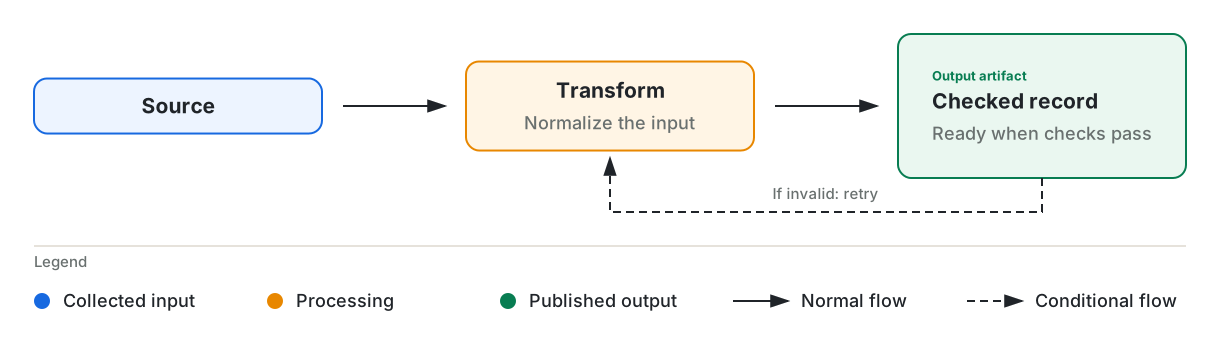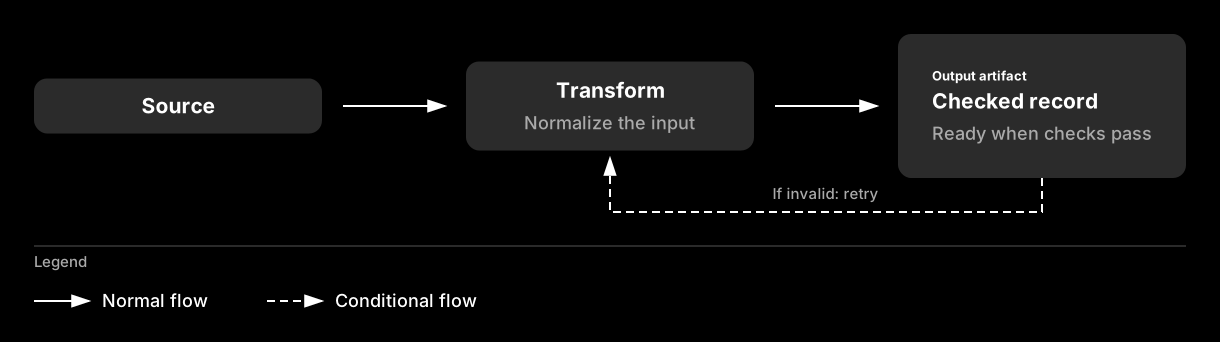
The dark theme draws all nodes in the same gray, so color keys cannot distinguish their roles. Connector styles remain
distinct in both themes. The example omits the dark theme’s color keys and moves its arrow keys left.
## Group the flow
Use `group_panel` to frame related nodes with a heading and muted caption. Reserve 55 units above the child nodes for
the heading and 34 units below them for the caption.
```python
diagram.text(610, 55, "Ingest pipeline", size=29, weight=550)
caption = "Peers with the same role use the same node pattern."
group_panel(diagram, 34, 89, 1152, 233, "Main flow", caption)
title_node(diagram, 89, 188.5, 288, "Source", role=NodeRole.ROOT)
centered_node(
diagram, 466, 171.5, 288, "Transform", "Normalize the input", role=NodeRole.PARENT
)
```
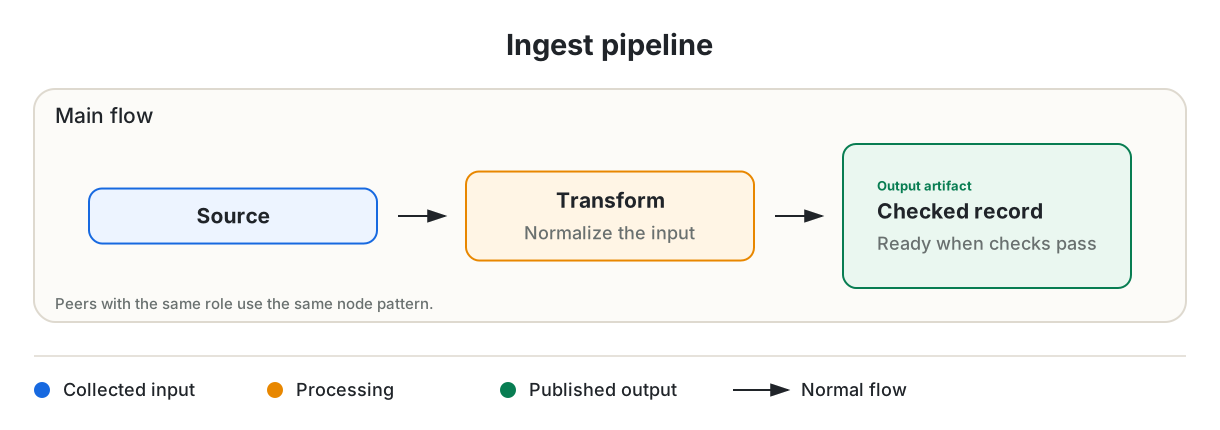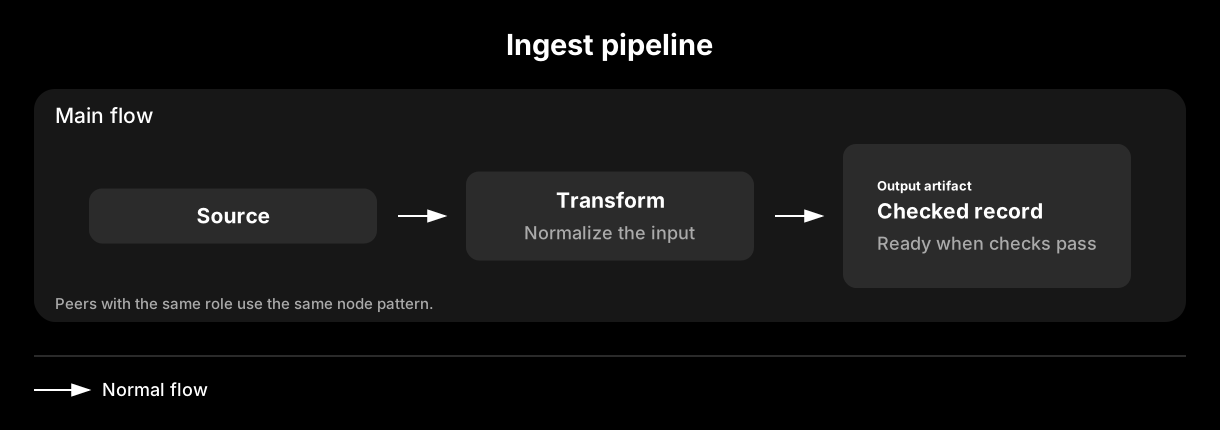
The panel is 233 units tall: 55 for the heading, 144 for the nodes, and 34 for the caption. Use `diagram.text` for a
heading or other standalone label. Its `y` coordinate sets the first line’s baseline. For multiple lines, pass a list
of strings. Pass `title=None` to `legend_header` to draw a rule without a heading.
## Branch on a condition
Use `decision_node` for a short question, and place each answer on its outgoing connector. `node_port` returns an
attachment point on one side of a box, so you do not have to calculate the edge coordinate.
```python
title_node(diagram, 34, 116.5, 233, "Record", role=NodeRole.ROOT)
decision_node(diagram, 377, 99.5, 233, 89, "Schema ok?")
diagram.line(*node_port(34, 116.5, 233, 55, PortSide.RIGHT), 356, 144, arrow=True)
box_label(diagram, 733, 89, 178, 55, "Accept", fill="leaf_fill", stroke="leaf", size=18)
box_label(diagram, 733, 178, 178, 55, "Quarantine", size=18)
accepted = node_port(377, 99.5, 233, 89, PortSide.RIGHT)
diagram.path([accepted, (667, 144), (667, 116.5), (712, 116.5)], arrow=True)
diagram.text(679, 108, "Yes", size=15, color="muted", weight=500, anchor=TextAnchor.START)
rejected = node_port(377, 99.5, 233, 89, PortSide.BOTTOM)
diagram.path(
[rejected, (493.5, 233), (667, 233), (667, 205.5), (712, 205.5)],
arrow=True,
dashed=True,
)
diagram.text(510, 225, "No", size=15, color="muted", weight=500, anchor=TextAnchor.START)
labeled_connector(diagram, (932, 116.5), (987, 116.5), "records")
box_label(diagram, 1008, 89, 178, 55, "Store", fill="leaf_fill", stroke="leaf", size=18)
```
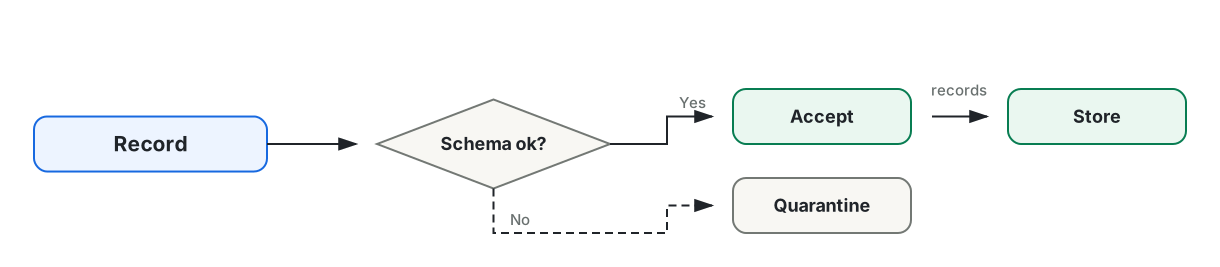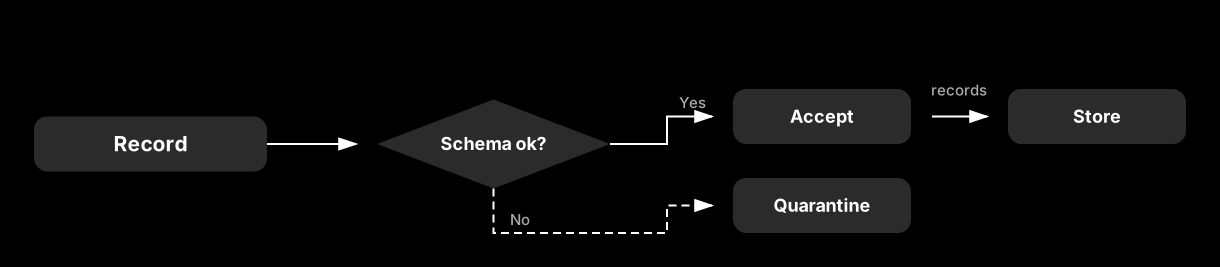
`box_label` draws the rounded box used by most named components. Pass a role’s `fill` and `stroke` to match a node, or
use the defaults for a neutral box. `labeled_connector` places a muted caption above a horizontal arrow. It raises an
error if the connector is not horizontal.
## Show a record and annotate it
`list_node` displays fields below a divider. `repeated_stack` draws three offset copies of a box to represent multiple
items. `junction` marks an intentional split and distinguishes it from crossing lines. `annotation_callout` places a
note on a leader line without an arrowhead.
```python
list_node(diagram, 34, 34, 233, "Record", ["id: string", "status: enum", "score: float"])
diagram.line(288, 99.5, 356, 99.5, arrow=True)
repeated_stack(diagram, 377, 55, 233, "Documents", "24 per batch")
diagram.line(644, 99.5, 678, 99.5)
junction(diagram, 686, 99.5)
diagram.line(686, 99.5, 788, 99.5, arrow=True)
box_label(diagram, 809, 72, 233, 55, "Publish", fill="leaf_fill", stroke="leaf", size=18)
diagram.path([(686, 99.5), (686, 199), (788, 199)], arrow=True)
box_label(diagram, 809, 171.5, 233, 55, "Cache", size=18)
annotation_callout(diagram, 1097, 191, ["Expires after", "15 minutes"], (1042, 199))
```
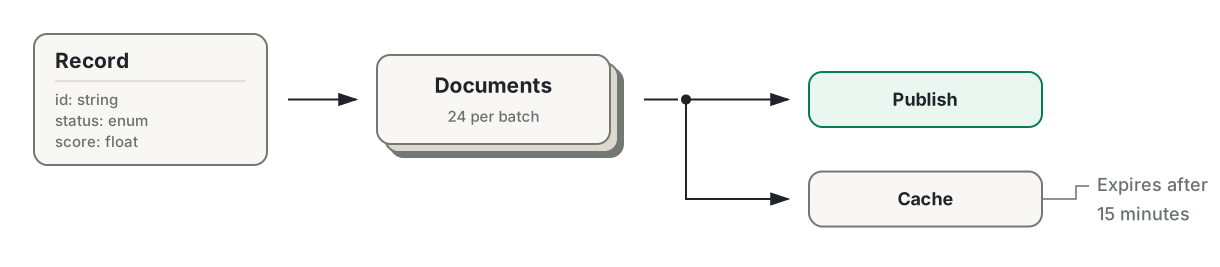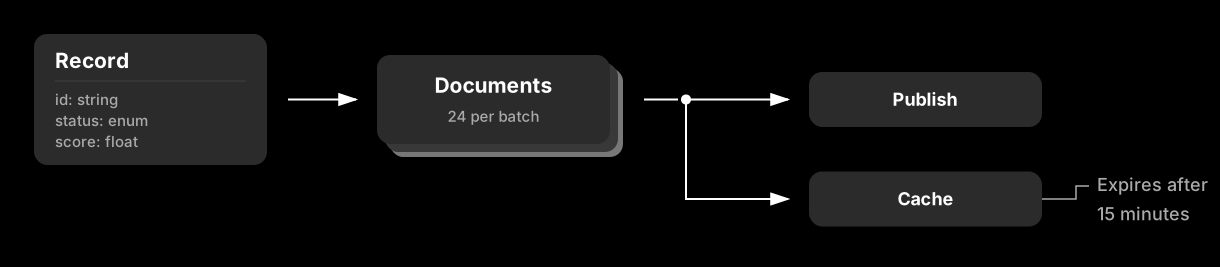
`list_node` returns its height: 68 units plus 21 units per row. This includes a 55-unit header, 21 units for each field,
and a 13-unit footer. Use the returned height to position the next component.
## Divide work into lanes
A `swimlane` creates a labeled work area for an actor, stage, or system. A `boundary_frame` marks an ownership or
containment boundary. The boundary keeps its outline even when the active theme omits other borders.
```python
boundary_frame(diagram, 34, 34, 1152, 288, "Private network")
swimlane(diagram, 55, 89, 1110, 89, "Extract")
swimlane(diagram, 55, 199, 1110, 89, "Publish")
extract = ((233, 178, "Parse"), (500, 178, "Normalize"), (767, 178, "Score"))
for x, width, label in extract:
box_label(diagram, x, 106, width, 55, label, fill="parent_fill", stroke="parent", size=18)
labeled_connector(diagram, (432, 133.5), (479, 133.5), "records")
diagram.line(699, 133.5, 746, 133.5, arrow=True)
```
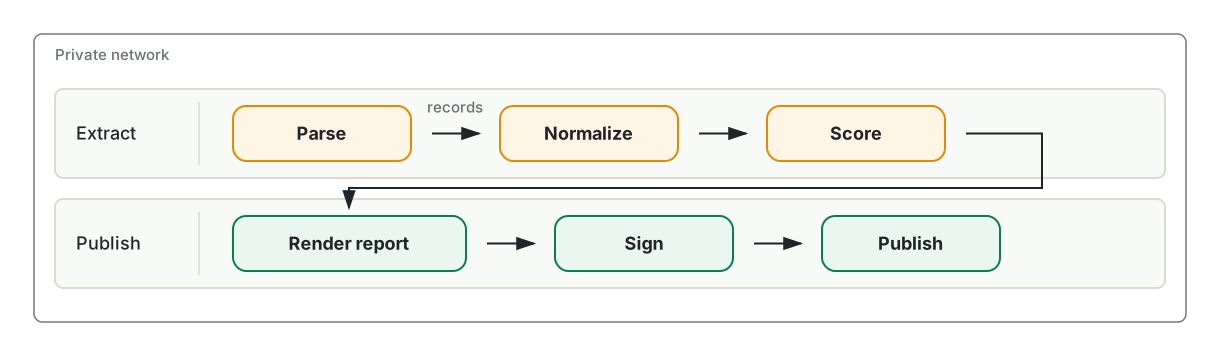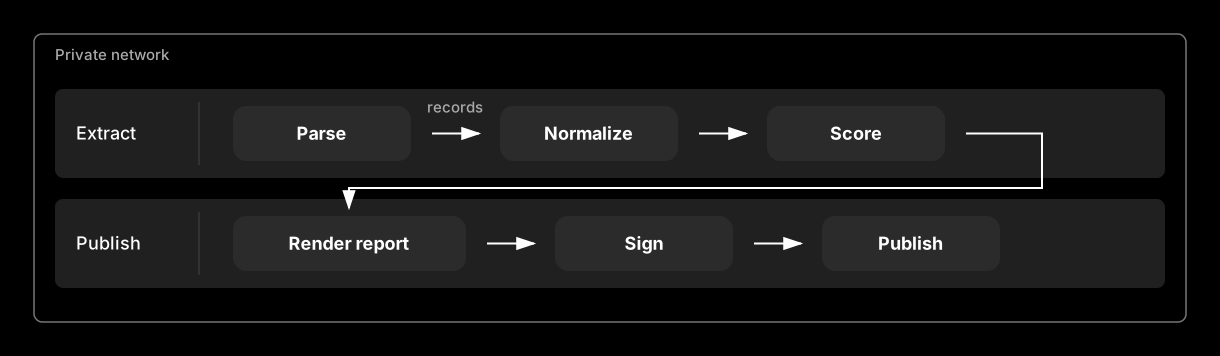
A swimlane reserves its first 144 units for the header. Place its boxes after that column.
## Name a node with an icon
`icon_node` places a Lucide icon to the right of a left-aligned title and description. The icon is decorative and does
not replace the title.
```python
sources = (
(34, 34, "Warehouse tables", "Nightly extract", LucideIcon.DATABASE, NodeRole.ROOT),
(682, 34, "Spreadsheets", "Uploaded by analysts", LucideIcon.TABLE_2, NodeRole.ROOT),
(34, 178, "Runbooks", "Narrative context", LucideIcon.NOTEBOOK_TEXT, NodeRole.PARENT),
(682, 178, "Checked record", "Checks passed", LucideIcon.FILE_CHECK_2, NodeRole.LEAF),
)
for x, y, title, description, icon, role in sources:
icon_node(diagram, x, y, 504, title, description, icon=icon, role=role)
```
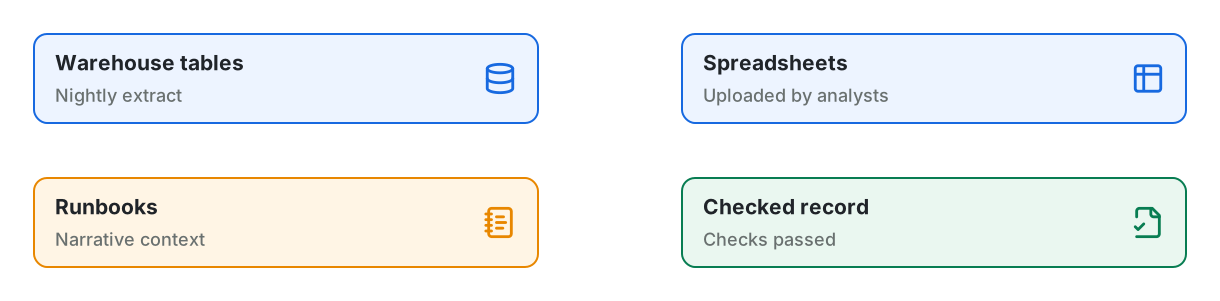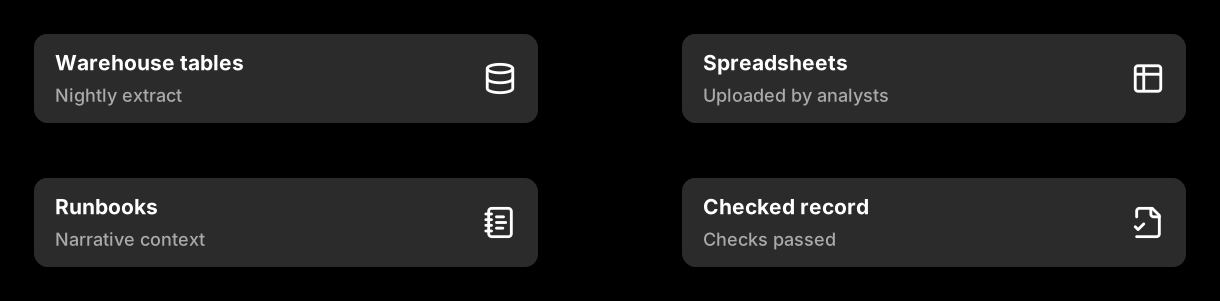
`LucideIcon` defines several common icons. You can also pass any icon name from the pinned Lucide release as a string.
The first use downloads the icon geometry and upstream license from the pinned package, then caches both on disk. Later
runs use the cache without a network connection. The library converts the geometry to plain SVG shapes and excludes
scripts and external references. Each icon is 34 units square with a 21-unit gutter on each side, so an icon node must
be at least 144 units wide.
To draw an icon outside a node, append the result of `lucide_icon_element`. An accent color requires the zero-based
geometry indices in `accent_parts`. A two-stop gradient requires an `element_id` that is unique in the document. You
cannot combine an accent with a gradient. Lucide color arguments must be hexadecimal values.
```python
lucide_icon_element("database", accent="#087d52", accent_parts=(0,))
lucide_icon_element(
"database", gradient=("#1769e0", "#087d52"), element_id="database-gradient"
)
```
## Choose a theme
The light theme uses bordered, tinted surfaces on a transparent canvas. The dark theme uses borderless gray surfaces
and white text on a black canvas. Component positions remain the same in both themes.
```python
Diagram("Ingest", theme=DiagramTheme.DARK) # gray surfaces on a black canvas
Diagram("Ingest", background="#ffffff") # a solid canvas, not a transparent one
Diagram("Ingest", background=("#fdf6ec", "#eef7f1")) # a gradient wash across the canvas
Diagram("Ingest", theme=DiagramTheme.DARK, borders=True) # dark, with the role strokes drawn
```
The `background`, `borders`, and `palette` arguments override the corresponding theme settings. The dark examples on
this page retain the black canvas, so each appears as a framed image.
Paint arguments on `Diagram` drawing methods and component functions accept a palette key such as `"ink"`, `"muted"`,
or `"root_fill"`. The diagram resolves the key against the active theme. It treats an unknown string as a literal CSS
color.
## Palette keys
Both themes define the same fourteen keys. You can override any of them. The table shows the default values.
| Key | What it colors | Light | Dark |
|--------------------------|------------------------------------------------------------|-----------------------|-----------------------|
| `ink` | Titles, body text, connectors, and arrowheads | `#202429` | `#ffffff` |
| `muted` | Descriptions, captions, field rows, and legend labels | `#69706f` | `#aaaaaa` |
| `line` | Neutral boxes, decision nodes, and boundary frame outlines | `#737874` | `#777777` |
| `soft_line` | Panel and lane outlines, legend rules, and dividers | `#ded9cf` | `#383838` |
| `background` | The canvas | `#f5f2ec` | `#000000` |
| `panel` | The `group_panel` surface | `#fcfbf8` | `#171717` |
| `panel_alt` | The `swimlane` surface | `#f7faf7` | `#202020` |
| `neutral_fill` | Neutral component surfaces | `#f8f7f3` | `#2b2b2b` |
| `root` / `root_fill` | The `ROOT` node stroke and fill | `#1769e0` / `#edf4ff` | `#ffffff` / `#2b2b2b` |
| `parent` / `parent_fill` | The `PARENT` node stroke and fill | `#e88700` / `#fff5e5` | `#ffffff` / `#2b2b2b` |
| `leaf` / `leaf_fill` | The `LEAF` node stroke and fill | `#087d52` / `#eaf7f0` | `#ffffff` / `#2b2b2b` |
The `background` and role stroke keys depend on other settings. The light theme leaves the canvas transparent unless
you pass `background="background"`. Role strokes appear only when `borders` is enabled. The light theme enables borders
by default, while the dark theme disables them. In the default dark palette, all roles have the same gray fill and white
stroke. Set `borders=True` to show those strokes, or override the role colors to distinguish the roles.
Import `LIGHT_PALETTE`, `DARK_PALETTE`, or `theme_palette(theme)` to read the existing theme mappings. Copy a mapping
before changing it because these objects hold the global theme state.
```python
from mdreport import DiagramTheme, theme_palette
palette = dict(theme_palette(DiagramTheme.LIGHT))
palette["root"] = "#0e9f6e"
```
## Brand the palette
Pass only the changed keys to `palette`. All other keys retain the theme defaults.
```python
BRAND_PALETTES = {
DiagramTheme.LIGHT: {
"root": "#0e9f6e", "root_fill": "#ecfdf5",
"leaf": "#7c3aed", "leaf_fill": "#f3e8ff",
},
DiagramTheme.DARK: {
"root": "#34d399", "root_fill": "#0c2b22",
"leaf": "#c4b5fd", "leaf_fill": "#231a39",
},
}
diagram = Diagram("Ingest", width=987, height=144, theme=theme, palette=BRAND_PALETTES[theme])
```

Define separate overrides for each theme. A tint that works behind dark text on a light canvas can obscure white text
on a dark canvas.
## Adjust border widths
Set `Diagram(stroke_width=...)` to change the default width for rectangle-based components and the canvas frame. Pass
the same argument to a supported component to override one node. The default width is 2. Connectors use their own
`width` argument. `decision_node` uses a fixed width of 2, and `boundary_frame` uses a fixed width of 1.5.
## Use gradients
`diagram.gradient` defines a two-stop linear gradient and returns a paint value. Use that value anywhere the API accepts
a color, including a node’s fill and border. Each stop can be a palette key or literal color. The gradient axis uses
fractions of the element’s dimensions. By default, it runs from corner to corner; `x2=1, y2=0` makes it horizontal.
The canvas can also use a gradient. Pass two colors to `background` to create a full-canvas gradient with the reserved
ID `canvas`. Other gradient names remain available.
```python
stops = BOLD_GRADIENTS[theme]
diagram = Diagram(
"Ingest", width=1220, height=144, theme=theme,
stroke_width=3, borders=True, background=stops["canvas"],
)
warm = diagram.gradient("warm-fill", *stops["fill"])
bold = diagram.gradient("bold-edge", *stops["edge"], x2=1, y2=0)
title_node(diagram, 34, 44.5, 288, "Source", role=NodeRole.ROOT)
centered_node(
diagram,
466,
27.5,
288,
"Transform",
"Normalize the input",
role=NodeRole.PARENT,
fill=warm,
stroke=bold,
stroke_width=5,
)
title_node(diagram, 898, 44.5, 288, "Store", role=NodeRole.LEAF)
```

This example stores gradient stops by theme, as shown in [Brand the palette](). In the dark theme,
`parent` and `leaf` are both white, so a gradient between them would appear as solid white. Separate dark-theme stops
keep the border visible against the black canvas.
The `fill` and `stroke` arguments accept a palette key, literal CSS color, or gradient paint. Either argument overrides
the color supplied by the node’s `role` without changing its semantic role. A standard `color_key` uses the role’s
palette stroke, not a node’s custom paint. `box_label`, `title_node`, `centered_node`, `information_node`, and
`icon_node` accept `fill`, `stroke`, and `stroke_width`.
Gradient definitions have three constraints:
- Each gradient name becomes an SVG ID and must be unique within the diagram. Defining the same name twice raises an
error.
- An `icon_node` uses a flat Lucide stroke for its icon. A gradient border does not change the icon color. To apply a
gradient to the icon, pass `icon_gradient` with a unique `icon_id`. Do not combine `icon_gradient` with
`icon_accent`; an accent requires one or more `accent_parts` indices.
- A borderless theme omits strokes on ordinary component surfaces, regardless of their width or paint. Frames and
boundary frames remain visible. In the dark theme, set `borders=True` to display a gradient node border. Gradient
fills do not require borders.
To control a canvas gradient’s axis, refer to its ID when you create the diagram, then define the gradient. SVG resolves
paint by ID rather than document order, so the definition can follow its first use.
```python
diagram = Diagram("Ingest", background="url(#hero)")
diagram.gradient("hero", "#fdf6ec", "#eef7f1", x2=1, y2=0)
```
## Frame the canvas
Use `diagram.frame` to outline the canvas. It accepts palette keys, literal colors, and gradient paints. Pass `radius`
to round the corners.
```python
diagram = Diagram("Ingest", width=466, height=144, background=("#fdf6ec", "#eef7f1"))
edge = diagram.gradient("edge", "parent", "leaf", x2=1, y2=0)
title_node(diagram, 89, 44.5, 288, "Source", role=NodeRole.ROOT)
diagram.frame(edge, width=6, radius=21)
```
The method places the outline half a stroke inside the viewBox. A rectangle drawn directly on the edge loses its outer
half to clipping and appears thinner than requested. The frame width defaults to the diagram’s `stroke_width`.
Frames and boundary frames remain visible under borderless themes. Call `frame` last if it must appear above content
that reaches the canvas edge.
## Draw a shape the library does not have
Use `svg_element` to create an SVG element and `append` to add it to the canvas. The function converts underscores in
attribute names to hyphens and omits attributes set to `None`. The serializer escapes all attribute values.
```python
diagram.append(
svg_element(
"ellipse",
cx=493.5,
cy=72,
rx=89,
ry=55,
fill=diagram.color("parent_fill"),
stroke=diagram.color("parent"),
stroke_width=2,
)
)
diagram.text(493.5, 79, "Queue", size=21, weight=550)
```

`diagram.color` resolves a palette key for the active theme, which avoids hard-coded hex values in custom elements. The
ellipse has horizontal and vertical radii of 89 and 55 units, for a total size of 178 by 110 units. It uses the same
golden proportion as other dimensions in the default scale.
## Save or serialize
Use `save` to write a standalone SVG. `to_string` returns serialized SVG text, while `data_url` returns a base64-encoded
data URL.
```python
diagram.save(Path("data/ingest-pipeline.svg"))
```
The generated SVG is indented and deterministic. Committed diagrams produce readable diffs only when their source
changes.
## The scale
Default component sizes follow a single golden-ratio system.
`FIBONACCI_SPACE` contains these lengths: 3, 5, 8, 13, 21, 34, 55, 89, 144, 233, 377, and 610. Consecutive Fibonacci
numbers approach φ, giving adjacent steps golden proportions while keeping coordinates as whole numbers. The defaults
use 21-unit insets, 34-unit card insets and icons, and node heights of 55, 89, or 144 units. The wide examples use
288-unit nodes, 144-unit gaps, and 34-unit outer margins.
`TYPE_SCALE` contains these text sizes: 13, 15, 18, 21, 25, 29, and 34. Each size is about the preceding size multiplied
by the cube root of φ. Three steps produce a full golden-ratio increase, such as 13 to 21 to 34. The defaults use 18
for body text, 21 for node titles, and 29 for diagram headings.
Line spacing also follows φ. The next line begins about φ times its font size below the current baseline. In a text
stack, the gap between rows is the upper row’s size divided by φ. Common sizes therefore align with the Fibonacci
scale: 13-unit text advances by 21 units, 21-unit text by 34, and 34-unit text by 55. The gutter constants follow the
same calculation: 13 divided by φ is about 8, and 21 divided by φ is about 13.
Three functions apply the scale to custom layouts. Each result is rounded to a whole unit.
```python
from mdreport import golden_height, golden_point, golden_split
golden_height(1120) # 692 — the height that makes 1120 a golden rectangle
golden_split(1152) # (712, 440) — the two parts of a golden cut
golden_point(0, 610) # 377 — the off-center line to sit a focus on
```
Pass `from_end=True` to `golden_point` to mirror the cut and move the focus toward the start of the span. This position
works for a title band or heading.
## Component sizes
Use these fixed heights to position adjacent nodes. The heights follow the scale, so you can center mixed nodes by
offsetting each one by half the difference in height.
| Component | Height |
|--------------------|---------------------------------------------------|
| `title_node` | 55 |
| `centered_node` | 89 |
| `icon_node` | 89 |
| `information_node` | 144, plus 29 per description line after the first |
| `list_node` | 68, plus 21 per row |
| `repeated_stack` | 89, plus a 13-unit offset behind it |
Container components use dimensions supplied by the caller. A `group_panel` reserves 55 vertical units for its heading
and 34 for its caption. A `swimlane` reserves a 144-unit-wide header column on the left.
Import the named constants to calculate layouts: `TITLE_NODE_HEIGHT`, `CENTERED_NODE_HEIGHT`, `ICON_NODE_HEIGHT`,
`INFORMATION_NODE_HEIGHT`, `PANEL_HEADING_BAND`, `PANEL_CAPTION_BAND`, and `LANE_HEADER`.
`information_node` and `list_node` return their calculated height. Validation varies by function. For example,
`Diagram.rect` validates its geometry, while the low-level `svg_element` helper does not. Blank paint values are
rejected, but unknown nonblank strings pass through as literal CSS paint. See the [API reference](api-reference.html.md)
for every component, argument, and validation rule.
# extensions.html.md
# Extensions
Create a block when the report methods do not support the content you need.
## Create a block
A block has a `__report__` method. The method returns Markdown text or Markdown tokens.
```python
from dataclasses import dataclass
from mdreport import BlockContent, MarkdownReport
@dataclass(frozen=True)
class Aside:
content: str
def __report__(self, report: MarkdownReport) -> BlockContent:
return f"> {self.content}"
report = MarkdownReport().title("Findings")
report.append(Aside("Numbers are provisional."))
```
You do not need a base class or a registration step. Do not change the report inside `__report__`.
## Add a block
```python
report.append(block)
report += block
new_report = report + block
```
`append` and `+=` change the report. The `+` operator returns a changed copy.
## Return tokens
A report holds its content as a Markdown syntax tree, not as text. The string you return from
`__report__` is parsed into tokens before it joins that tree, so both routes end in the same place.
Return tokens to skip the parse and build the tree yourself.
The token builders assemble the pieces. This block pairs a bold caption with a fenced query:
```python
from dataclasses import dataclass
from markdown_it.token import Token
from mdreport import MarkdownReport, bold_paragraph_tokens, fence_token
@dataclass(frozen=True)
class Query:
sql: str
title: str
def __report__(self, report: MarkdownReport) -> list[Token]:
tokens = bold_paragraph_tokens(report.parser, self.title)
tokens.append(fence_token(self.sql, "sql"))
return tokens
report.append(Query("select count(*) from orders", "Order volume"))
```
```markdown
**Order volume**
```sql
select count(*) from orders
```
```
Three reasons to build tokens instead of a string:
- **The builders get the format’s edge cases right.** `fence_token` widens the fence when the code
contains backticks. `table_tokens` escapes the pipes and turns the newlines in a DataFrame cell
into `
`. Written as a string, both corrupt the document instead.
- **`raw_token` bypasses Markdown.** Its content reaches the file untouched. No string can do this,
because a string is always parsed.
- **A `text` token stays literal.** The builders that take `report.parser` parse their argument as
inline Markdown, so a caption of `Top _accounts_` comes out as emphasis. Put the value in a
`Token("text", "", 0, content=value)` when it has to survive as data, and the renderer escapes it
on the way out.
A Markdown string is the better choice when you write the whole block yourself, as `Aside` does
above. Reach for tokens when your data decides the content.
The [API reference](api-reference.html.md) lists all token builders.
## Read the finished document
There are cases where you need to wait till the report is fully constructed before you can determine a block’s content. But `__report__` runs the moment you append the block, so it cannot see the rest of the report.
So if you want to wait until the report is fully constructed before determining a block’s content, give your block a `__resolve__` method instead. This is useful when your block summarizes, counts, or links to other content.
When you `append` a deferred block, it stores a placeholder. The report calls `__resolve__` during `render` and puts the returned content where the placeholder sits.
```python
from dataclasses import dataclass
from markdown_it.tree import SyntaxTreeNode
from mdreport import BlockContent, MarkdownReport
@dataclass(frozen=True)
class HeadingCount:
def __resolve__(self, document: SyntaxTreeNode, report: MarkdownReport) -> BlockContent:
headings = sum(1 for node in document.walk() if node.type == "heading")
return f"This report has {headings} headings."
report = MarkdownReport().append(HeadingCount())
report.title("Findings").heading("Revenue")
print(report.render())
```
The count is 2, even though the block went in before either heading:
```markdown
This report has 2 headings.
# Findings
## Revenue
```
`document` is the report parsed into a [markdown-it-py](https://markdown-it-py.readthedocs.io)
syntax tree. Walk it to find the nodes you care about. `report` gives you the parser, the same as
in `__report__`.
Two rules follow from resolving at render time:
- A deferred block never sees another deferred block’s output, so the order you append them in does
not change what each one reads.
- `render` resolves the block again every time you call it, so a report that grows between renders
produces an up-to-date block each time.
`TableOfContents` works this way. It is why you place the contents at the top and still list the
headings you add later.
# markdown.html.md
# Markdown
Create a `MarkdownReport`, add content, and then render or save it.
## Add common content
```python
from mdreport import MarkdownReport
report = (
MarkdownReport()
.title("Pipeline health")
.heading("Summary")
.text("All nightly jobs finished before 06:00.")
.bullet_list(["12 jobs passed", "0 jobs failed"])
.numbered_list(["Collect data", "Check data", "Publish report"])
.code_block("select count(*) from jobs", language="sql")
)
```
Both list methods nest to any depth. Write a sublist as a list immediately after the item it hangs
beneath.
```python
report.bullet_list([
"Infrastructure",
["Database", "Cache", ["Redis", "Memcached"]],
"Application",
])
```
Use `markdown` for content such as a quote or an image.
```python
report.markdown("> Numbers are provisional.")
```
## Add a callout
Use `callout` for a portable, titled block quote. Its message supports Markdown and template
parameters.
```python
from mdreport import CalloutKind
report.callout(
"Numbers for **{{ period }}** are provisional.",
kind=CalloutKind.WARNING,
params={"period": "Q3"},
)
```
The kinds are `NOTE`, `TIP`, `IMPORTANT`, `WARNING`, and `CAUTION`. Pass `title` to replace the
kind’s title.
## Add figures
Use `figure` for a numbered image with alternative text and an optional caption.
```python
report = (
MarkdownReport()
.figure(
"charts/revenue.png",
alt_text="Revenue by region",
caption="Quarterly **revenue** by region.",
)
)
```
Captions receive `Figure 1`, `Figure 2`, and so on in document order during `render`.
By default, the image remains linked to its path or URL. Set `is_embedded=True` to make a local
image part of the Markdown document:
```python
report.figure(
"charts/revenue.png",
alt_text="Revenue by region",
is_embedded=True,
)
```
Raster images become base64 data URLs. SVG files are copied into the document as inline markup,
inside an accessible wrapper carrying the alternative text. Embedding reads local files only; it
does not download a remote URL. Only embed trusted SVG files because their markup is preserved.
Some hosted Markdown viewers disallow data URLs even though the generated document is
self-contained.
## Add a DataFrame
Use `table` for a Markdown table. Use `csv` when readers need to copy the data.
```python
import polars as pl
metrics = pl.DataFrame({
"region": ["EMEA", "APAC"],
"revenue": [1234.567, 890.1],
})
report.table(metrics, title="Revenue by region", decimal_places=1)
report.csv(metrics, title="Revenue data")
```
Both methods include every row and column. Slice a large DataFrame before you add it.
## Add template values
Pass a `params` mapping to fill Jinja variables.
```python
report.text(
"Generated on {{date}} by {{author}}.",
params={"date": "2026-08-28", "author": "Asif"},
)
```
Templating runs only when you pass `params`. Leave it out when the content contains literal Jinja braces.
## Add frontmatter
Use `frontmatter` to add YAML metadata to the top of the report.
```python
report.frontmatter(title="Q3 review", author="Asif")
report.frontmatter({"table-of-contents": True})
```
Later calls can add fields or replace their values.
## Add a table of contents
Place `table_of_contents` where you want the list. It includes headings that you add later.
```python
report = (
MarkdownReport()
.title("Q3 review")
.table_of_contents()
.heading("Revenue")
.heading("Costs")
)
```
Entries link to each heading’s anchor, so the list reads as `- [Revenue](#revenue)`. Narrow the
list with `start_level` and `depth` — `table_of_contents(start_level=2, depth=2)` covers level 2
and level 3 headings, skipping the title.
## Link to headings
The anchors the contents link to are the ones a renderer derives from the heading text. GitHub,
GitLab, Pandoc, and MkDocs all generate them, so the links resolve with nothing written into the
document. Two headings with the same text are numbered apart, as `#findings` and `#findings-1`.
For a renderer that generates no anchors, write them into the document:
```python
from mdreport import HeadingAnchorStyle, MarkdownReport, slugify
MarkdownReport(anchor_style=HeadingAnchorStyle.HTML) # ## Revenue
MarkdownReport(anchor_style=HeadingAnchorStyle.ATTRIBUTE) # ## Revenue {#revenue}
report.markdown(f"Back to [revenue](#{slugify('Revenue')}).") # link to a heading
```
`ATTRIBUTE` is the syntax Pandoc, kramdown, and python-markdown’s `attr_list` understand; anything
else renders it as visible text.
## Render or save
```python
markdown = report.render()
print(report)
report.save("reports/q3.md")
```
`render` returns a string. `save` writes the same Markdown to a UTF-8 file.